#780: The inexorable (?) shift to Electric Vehicles

[Following from part 1, #779: Is the car industry doomed?]

Car manufacturers have been working on the assumption that soon, they will only be selling hybrid and then fully electric vehicles (EVs). Given that the gestation of a new car model is measured in years if not decades, they’ve been pouring $Billions into developing new car designs, new software platforms and new electric drivetrains. They need to skate to where the puck will be, which means there’s a lot at risk if they get assumptions and forecasts wrong.

Initially, some makers offered EVs as an alternative to the pure internal combustion engine (ICE) in existing models – hence you’d see different versions of similar-looking cars being sold, some with just ICE, some with a hybrid of ICE and electric and some with just Battery Electric (BEV). Volvo offered its XC40 in 2021 with 4 different petrol engines, 2 plug-in hybrids, 2 diesels and an EV option. Prices ranged from £25K for the most basic petrol T2 to £60K for range topping electric P8.

Abbreviation soup*

The purest EV/BEV is simply a car that uses one or more electric motors to propel itself. Power probably comes from a large, heavy lithium-ion battery that can take hours to recharge. Public fast-charging stations are springing up but can be complex to install (given the power requirements they need from the grid), and are many times more expensive to use than domestic electricity costs.

The industry keeps playing with other charging solutions such as swappable battery packs (like old laptops used to offer), or hydrogen fuel cells which generate their own electricity, dispensing with the battery but needing to find ways of getting the notoriously tricksy hydrogen on board.

As technology has matured, existing car companies evolved their ranges by launching new models that were designed specifically as EVs, so could be different to traditional cars in layout.

Mild Hybrids (sometimes known as MHEVs) are easiest to engineer, since they have a small electric motor and battery combination that may just provide additional oomph to the existing ICE, so don’t necessarily have the ability to run on electricity only. They can help the engine be more efficient but don’t replace it in function.

These have been around for years, in various forms – the first outside of Japan was launched 25 years ago, the Honda Insight.
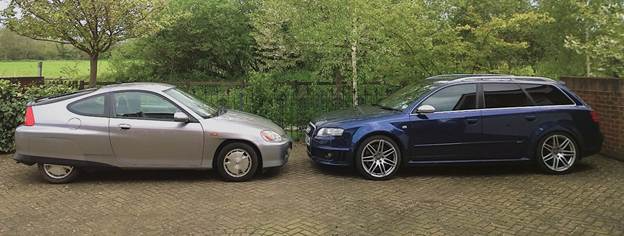
2001 Insight, 80g/km, 1L/3cyl and 87bhp, 85+mpg | 2007 Audi, 322g/km, 4.2L/8cyl and 414bhp, ~20mpg

Honda was just showing what was possible if engineers tried really hard to be efficient. Volkswagen did it 10 years later, with the XL1,  and various other manufacturers tried, but the most ultra-efficient cars were never really mainstream. Nowadays, Mild Hybrid (or “Self-charging Hybrid” as Toyota calls them) are the easiest way for manufacturers to add some electrification to an existing car platform.

Plug-in Hybrids (PHEVs) try to offer the best of both worlds – a decent sized battery and an electric motor that could drive the car for maybe 50-60 miles, with a reasonable ICE there to provide longer range and more power. On the face of it, PHEVs are the perfect compromise – no real “range anxiety” of needing to charge the car when on longer journeys, while all the pottering about near home or even short commuting can be done like an EV and charged cheaply from home with a plug-in wall charger.

But there are downsides – when the PHEV runs out of electricity, it’s running just like an ICE car, but it’s got a 200kg-ish battery to lug around. When it’s on EV mode, the battery might be a lot smaller than the three-quarter-tonne affair you’d find in a Tesla, but it’s now got the anchor of a passive ICE to make it less efficient, and the motor is probably not as powerful as a pure EV car would have.

Clearly, we have the complexity of both systems to deal with, meaning there’s also more that might one day go wrong.

There’s also a generally unspoken concern about PHEVs – drift up to a roundabout in EV mode and give the accelerator a boot to get in with the flow of traffic, or sweep down a motorway slip-road in EV mode and put your foot down to get up to speed, and you might cause the ICE to fire up and join the party. In principle, that’s great – more ICE power when you need it, and after a while it’ll shut down to let you cruise along in EV mode again.

But what if that ICE hasn’t had the chance to warm itself up yet? If it was a regular car, its oils and seals and things would ideally have been ticking over for a while before being asked to perform at max power.

If the PHEV had been wafting around on electric drive before arrival at that first roundabout, then the driver demands a slug of power that the EV bit can’t deliver, the car is showing the same kind of mechanical sympathy as starting it up from cold and then jumping straight on the power at thousands of RPMs. Sure, the engines should have been designed and lubricated for this mode, to some degree, but who knows what this kind of “duty cycle” will do for long-term reliability.

Finally, there’s another variant that might become more prevalent than PHEVs – the EREV or Extended Range Electric Vehicle. The earliest example was probably the original BMW i3 REX – it’s an electric car but also has a small petrol motor which is used to top up the charge in the battery, giving it additional range. It’s quite possible that more EV makers will start offering this kind of option as a way of dealing with range anxiety. If they’re allowed to.

*Friend of the newsletter Neil Marley eloquently ranted on LinkedIn recently about the distinction between acronym and abbreviation. It would be tempting to say “PHEV” is an acronym, but it’s an abbreviation. Acronyms are new words like “laser” or “radar”; if you have to spell the letters out (like “WFH” or “EV”) then it’s an abbreviation. Capisce?


Driving EV adoption

Leaving aside the truly experimental, the highly compromised early EVs in the modern era were very much the environmentalist’s choice, before Tesla launched the Model S in 2012 and made them arguably as good as existing car options. Most people – though not all – who drive EVs are won over by their smoothness and technology, as well as the feeling they’re helping the planet.

As it happens, the earliest electric cars arguably pre-date the OG petrol vehicle, but lead-acid batteries and later nickel-cadmium rechargeables can’t hold enough juice for any kind of range. It took the development of lithium-ion batteries in the late 20th century to make a mass-market EV practical, banishing the milk float memories of the 1970s.
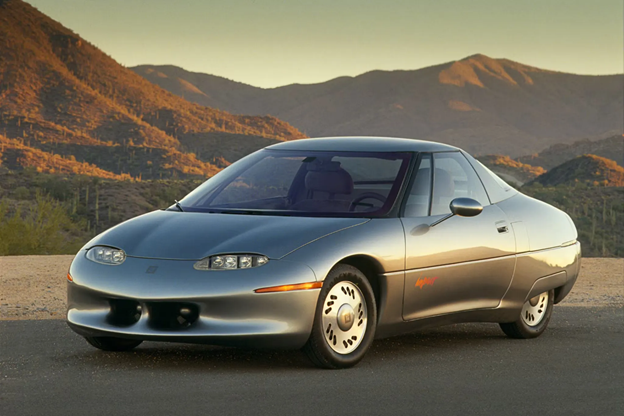
GM’s short-lived EV1, 1996-1999

There’s increasing evidence that EVs can last better than expected, better than petrol or diesel cars. With lower vibration and heat cycles running through the car every time it’s used, and fewer moving oily bits and other parts, there’s less to go wrong, and less that needs servicing. Even the brakes might not wear out as quickly since they’ll use the motors to slow the car down: so-called “regenerative braking” is really just reversing the motor to slow the car through putting drag on the drivetrain, also generating & storing electricity for later use.

Electric car sceptics might say that if the average EV is heavier than an ICE alternative, they’ll potentially wear the roads out more quickly, and though they might not be chucking out CO2 and NOx, they could be throwing tyre particles around in greater volume than lighter cars… though that argument is largely debunked.

Whatever, the industry was at an inflection point a few years ago – when should they stop developing or even stop producing “traditional” cars, and instead put all their efforts into the new technology? Eventually, the price difference between the two might go away but at least in the early days, it was not uncommon for EV versions of an existing car to be significantly more expensive.

Charging challenges

YouTuber Harry Metcalfe has covered a few gremlins with relying on public charging networks; if you can find a charger that works, it takes a long time and isn’t necessarily cheaper than petrol or diesel.

If you could charge your EV at 350kWH and it could cover 3 miles for every kW used, a large 100W battery would still take ~25 minutes to fully charge, and might give you 300 miles of range, at a cost of up to £79 from (for example) GridServe.

Compare that to an average petrol car that could do 36mpg, and you could fill a 55 litre tank in a few minutes, giving you 435 miles of range for about £74.

Right now, EVs only really make sense if you can charge them overnight on a domestic tariff at home – but that can only be for a proportion of the population. And taking a 100kW battery from 10% to 100% charge would take 13 hours and cost (for UK users) about £22, or considerably less if they are on the right power plan.

Maybe the ideal scenario for many households would be to have a larger PHEV or EREV for longer trips or carting the whole family+dog+gear around, and a small 2+2 city car for short haul stuff.

According to the UK government’s Office of National Statistics, the 2021 census gave us some interesting demographic information:

  • 23% of UK households have no cars, 41% have a single vehicle and 36% have two or more
  • 21% of households live in a flat. maisonette or apartment.
  • According to ZapMap, 67% of households have access to a driveway. 9 million households do not, so would need to rely on some kind of public charging network.
  • EVA England says that over half of existing EV owners who do not have a driveway rely solely on public charging. 60% of disabled drivers reported issues with accessibility in public chargers.

Is Hydrogen the answer?

Ideally, government should get involved to make sure there’s a sensibly-priced charging infrastructure in place, so people living in cities or blocks of flats don’t get disadvantaged when it comes to using an EV. An alternative might be to invest in having a hydrogen filling network, and then car companies could have a different fuel source for powering their EVs.

Car makers have experimented with Hydrogen as an alternative fuel source for years; a fuel cell car can take hydrogen, combine it with atmospheric oxygen to release electrical power, and produce nothing more than H20. It’s also possible to separate hydrogen from water, though it takes a lot of energy to do so – but large arrays of solar panels in a desert could capture huge amounts of power that would otherwise do nothing and split out hydrogen for onward shipment to where that energy is needed.
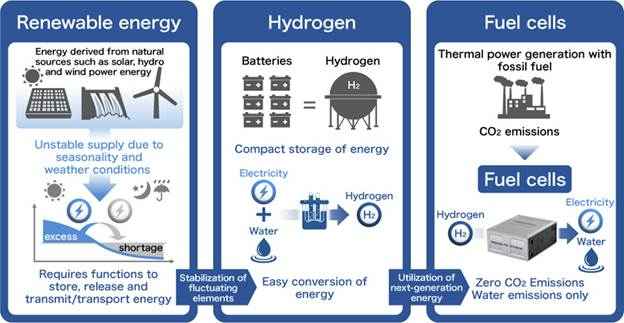
source: Honda

The challenge with Hydrogen is that it’s somewhat explosive.

Hindenburg airship, 1937

Well, it’s one of the most explosive elements, and can combust at very low concentrations in air. BMW, when making the experimental BMW Hydrogen 7 (which burnt hydrogen in its Internal Combustion Engine rather than using a fuel cell to generate electricity), advised users not to park the car under their house or in fact in an enclosed garage for any amount of time, in case the hydrogen leaked out and blew the whole thing to bits.

While it’s possible to transport hydrogen using variations of the natural gas supply network, it’s not without challenges and speaking with oil & gas safety and risk management specialists, there is little appetite to get involved with it right now. If that could be overcome, a good hydrogen distribution system was established and it became easy to refill your car, then it could provide a useful alternative to the weight and cost of lithium ion batteries and the charging time and range anxieties that negatively impact EV ownership.

A Toyota Mirai hydrogen fuel cell car can add about 5.6kg of hydrogen (at a cost of £10-15 per kg) to its tank in 5 minutes, and that is enough to drive for nearly 850 miles. The Mirai is no featherweight (nearly 2 tonnes) but otherwise is just an electric car in the way it drives, except that it has a compressed tank of gas rather than a big battery. Like Toyota, Honda has been working on hydrogen vehicles for years (including building a joint-venture fuel cell with GM, as used in the hydrogen powered CR-V).

Apart from its tendency for blowing up, the problem with hydrogen for fuelling automobiles is one of the chicken and egg – there are a handful of hydrogen stations in the UK, and the number has been falling, though the UK Gov has put in a bit of funding to add a few more. Without places to fuel up, hydrogen cars are not usable, yet without enough of them to drive demand for a refuelling network, the infrastructure is not viable.

Industrial power

The near-term future for hydrogen power is probably better suited for industrial applications, since the battery electric model is too hard to make work. As it happens, diesel has pretty good energy density – about 100x that of lithium-ion batteries by weight. So, to power an extremely large machine like the Liebherr T284 mining truck (which weighs 242 tonnes dry and has a fuel tank of 5,300L), would need about 500 tonnes of lithium ion batteries.

If you’ve got farm equipment, earth moving machinery or big diggers out in the field, you need them to be running all the time you can – meaning not only would batteries would need to be huge to power those machines on a 12-hour cycle, they would take days and days to recharge.
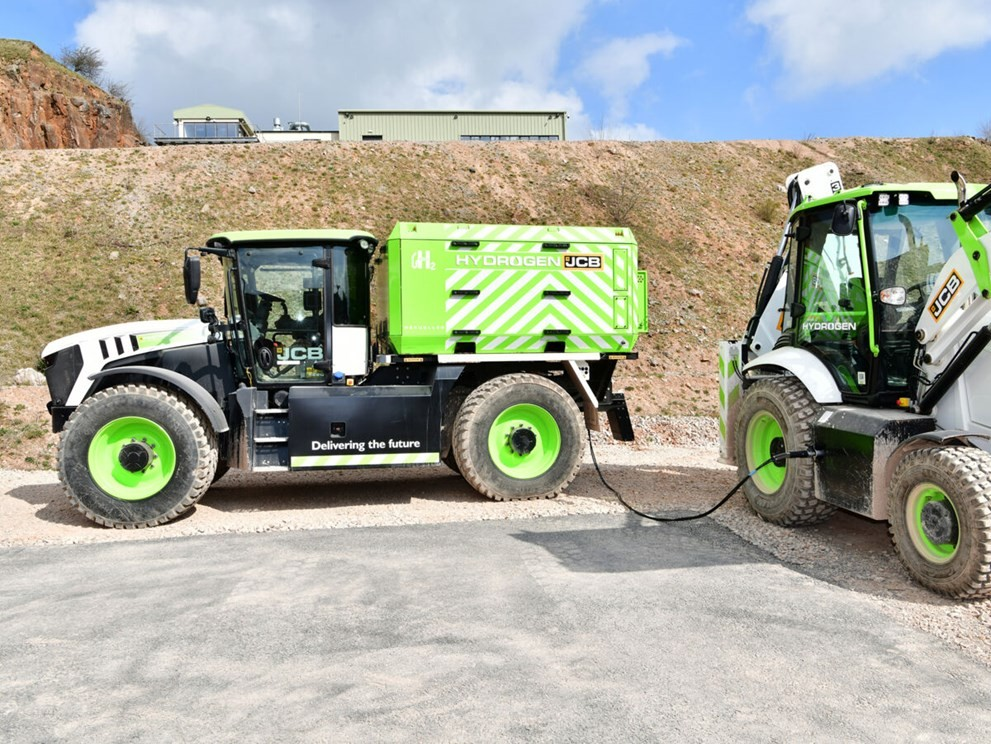
JCB has been working to build a variant of its diesel engine to run on combusting hydrogen instead. Driving a hydrogen bowser out to the field, connecting it to the fuel tank and filling it up on site makes more sense. Even with the machines burning hydrogen instead of using a fuel cell, it can be a near zero emissions model if the hydrogen was separated using green energy in the first place.

Eco-fuels then?

Another option being pushed by the automotive industry is the use of sustainable fuels. Some mix biofuel with existing fossil fuels to reduce the impact. Some are similar to the hydrogen combustion story with JCB, where if we could manufacture a purely synthetic fuel, then it could arguably be low or even zero emissions in total.

Porsche is investing in “eFuel” which uses hydrogen extracted using renewable energy and combined with atmospheric CO2. When it’s burnt in use later, any CO2 produced is only putting back the CO2 extracted during manufacture.

In motorsport, Goodwood is already using 70% sustainable fuel at the Revival event held in September. Formula 1 aims to be running on 100% sustainable fuel in 2026 – laudable if a little bit greenwashy, given the amount of air travel and freight required to get all their equipment to races…

To some degree, encouraging the continued use of existing fossil-fuelled cars by running them on (more) synthetic fuels is net-better for the environment than replacing everything with EVs. Manufacturing a new EV will add 20-odd tonnes of CO2 to the atmosphere – about the same as driving an average petrol car for 100,000 miles.


What does the future hold?

It’s difficult to be sure, but for now the car industry is still backing BEVs as the answer for domestic transportation. Mass transit like buses or for use in industrial settings, hydrogen looks like a much better option if they can deal with the distribution challenge. It seems unlikely that we’ll be running around in hydrogen-powered cars any time soon.

But there are very real charging challenges with BEVs that make it very difficult to imagine 100% usage. Even if pretty much all new cars are BEVs within the next few years, the average age of cars on the road is already growing – up to (in the UK) 9.5 years, up from about 8 before Covid. If you can charge your BEV at home, it’s great – every time you set off, your car is full of fuel. If you can’t charge at home, though, it’s going to be more hassle than if you’d had an equivalent petrol car.

Perhaps PHEVs or EREVs give us the best compromise, especially if they could be run on synthetic fuel. With a 10 year+ lifespan even PHEVs bought now could still be going strong well into the next decade.

The motor industry – especially in Germany, where it’s about 20% of all manufacturing – is lobbying the EU hard to dilute or even remove targets for transitioning to EVs, citing the relative lack of consumer demand and the huge costs they have incurred in engineering as being an existential threat.

Mercedes’ CEO Ola Kallenius recently said, “We need a reality check. Otherwise we are heading at full speed against a wall.”

The closer we get to the end of this decade, the more likely it is that governments will capitulate and extend the potential lifecycle of petrol/electric hybrid cars.


Final part – Government interference in the car industry; rarely a good thing

#779: Is the car industry doomed?

The global automotive industry is at a crossroads. Worldwide population growth and demand for cars means some cities are so choked with traffic, you’d be quicker walking. Environmental concerns are driving shifts to electrification while technology intended to improve safety is at risk of distracting and even causing accidents.

Meanwhile, costs have skyrocketed amid worries of slowing consumer demand for brand new cars, leaving industry titans in something of a quandary – they have to invest fortunes to build cars fit for the future. But have they developed vehicles which are too big, heavy and expensive, overburdened with technology that end users don’t want?

What next? Will self-driving autonomous cars become a reality any more than the flying cars vision from the 1950s?

This series looks into some trends, data and perhaps a gaze into the crystal ball on what it all might mean for cars we drive (if we do at all), and the industry which employs 2.6 million people and is valued at $2-3 Trillion annually.

There’s so much to cover, I’ll break it into three parts over the next few weeks.


Part i: “Give the people what they want!”

Some people say, ‘Give the customers what they want’, but that’s not my approach. Our job is to figure out what they’re going to want before they do.” — Steve Jobs

Steve Jobs is famously attributed as saying this, even though no definitive source has been found. Jobs supposedly went on to repeat the Henry Ford quote that if he asked people what they wanted, they’d say “a faster horse(which is almost certainly made up).

Jobs was right, at least when new technology is concerned – show them a Mac when all they’ve used is a command line, or an iPhone when they had a Nokia 2110 and you’ll have them hooked. In the car industry, though, things are a little more complex. One thing’s for sure – if you’d asked people in 1996 what they really want, not many would say “an electric car”.

Changing buying patterns

Rewind a generation or two, and consumer habits for buying cars were radically different than today. Every few years, people would change cars by going to the same dealer they always used and probably bought the same brand they always bought. Loyalty was almost cemented in – you were a Ford family because Dad always bought Fords, or a GM/Open/Vauxhall family as Uncle Ted worked in the nearby factory. Switching car brands would be like changing football team you support.

That started to change when established brands like BMW and Mercedes became more attainable and upwardly aspirational. New entrants came into the market offering arguably superior products, possibly cheaper and/or more reliable. Long warranties tempted people to try out otherwise unproven makes. The biggest shakeup, however, came about due to easy availability of finance.

For years, getting a new car on some kind of PCP deal has been the default (for UK buyers at least) – it’s estimated that ~90% of all new and used car acquisitions are financed, though that may be changing. The premise of PCP is that at the end of the agreement, you could walk away, buy the car outright for an agreed fee or, as happens most often, enter a new PCP for a different car. Historically, this last option has been most likely but is softening as higher interest rates bite and the uncertain future residual value of new cars (especially electric vehicles) puts the costs up more.

More people are leasing or taking a new car on a subscription. City dwellers might rely more on public transport and use Uber or a pay-per-use club like Zipcar. Whatever, the traditional demand and supply models are changing.


Long cycles

Cars take a long time to design and build. From early concepts through to figuring out how they could manufacture and later service the thing, to testing for performance in all climates and crash-worthiness, it takes years and costs millions if not billions of dollars.

Add to that the trend in the last 30 years of “platform sharing” – where a car company will build a modular platform that can be more easily adapted to fit different sizes or types of cars in its own range, or even across brands (looking at you, VW, Audi, SEAT, Porsche, Bentley, Lamborghini…). Having to radically update a whole platform let alone the models that it underpins is a very significant undertaking.

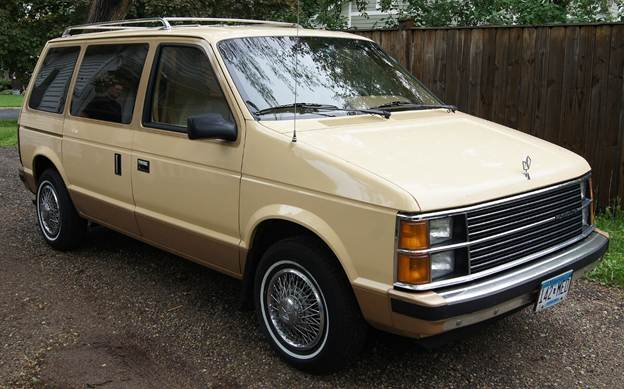
Sometimes, car manufacturers try a new model out and it really takes off, so everyone else jumps on the bandwagon. In the 1980s, Chrysler downsized the A-Team sized van to be more of a family run around, and came up with the “minivan” concept, a few months ahead of Renault launching the Espace in Europe. For years, MPVs were wildly popular, before “crossover” vehicles and SUVs started taking over.

Article content
Plymouth’s 1985 voyager “mini-van”

Sports Utility Vehicles (SUVs) account for nearly half of all new car sales worldwide and, according to the International Energy Authority, are responsible for a rapid growth in worldwide CO2 emissions. The IEA said if SUVs emissions were measured like a country, they’d be the 5th largest CO2 polluter in the world.

Both MPVs and SUVs are examples of users gravitating towards a new format, compared to their old saloons, hatchbacks, estate cars/station wagons etc. What’s the car industry to do? Make more of those, and less traditional cars, if that’s what people want to buy instead. Volvo recently announced that its XC60 is the most popular model ever, supplanting the iconic boxy 240 estates from the 70s. They’ve been threatening the demise of regular saloon/wagons for a few years.

A handy side-effect for the car makers is that they can jack up not just the ride height, but the margins of these larger cars, and that sometimes means others in their range get dumped due to low demand and/or low profitability. Ford cancelled the Fiesta, a small hatchback that was the best-selling car in the UK for years, for these very reasons.

So, the car industry needs to guess what people want a decade before they’ll be in a position to deliver it. They have to deal with legislature demanding better emissions (hence the journey to EVs) and improving safety.

For the most part, great – cars are way more comfortable and safer now for their occupants (though maybe less so if you’re on the outside; research says that if the US replaced all SUVs with regular-sized cars, 17% fewer pedestrians and cyclists would be killed each year). The trouble is all the extra impact protection, safety systems, airbags, screens, cameras, electric seats, 17-speaker surround sound stereo… they all add weight and cost. Cars are on average around 1/3 heavier now than they were 40 years ago, and there are many which are well over 2 tonnes. The largest electric SUVs are knocking on 3t.

Screens and buttons

As well as changing shape of cars and the way people acquire them, another significant trend over recent years has been the prevalence of in-car tech.

Article content
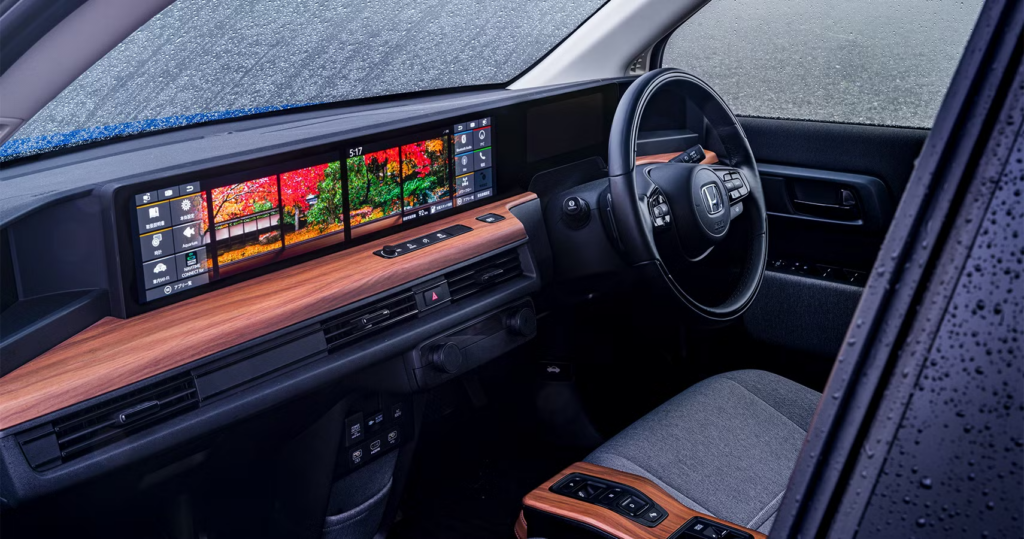
The 2020 Honda “e” – lots of screens but still had buttons for some things

Surveys of intending purchasers shows increasing demand for more safety and comfort systems – in 2023, the top requested thing was a wireless charging pad for your phone but by 2025, it’s more advanced cruise control and automatic-braking protection from reversing into things.

Most cars now offer one or more screens to control in-car systems. Consumers now expect Apple CarPlay or Android Auto on new cars (even on relatively budget-friendly ones), though car makers have been dragged somewhat into making them standard fitment – even a few years ago, Ferrari wanted over $4K as an optional extra to enable the tech, even though it was already fitted in the car and it was just a matter of turning it on.

Other manufacturers have tried monetising enabling features that are there already – as the guts of what the car does are increasingly software controlled, it’s easier to just build all the hardware into every car. BMW floated the idea of users paying monthly subscriptions to use certain features, like heated seats – but rightly got some robust end user feedback that they felt they were being ripped off buying a car with functionality present, then having to pay again to use it.

Other vendors have mooted charging subscriptions for more advanced functionality – like if self-driving becomes a reality, users might be expected to pay per journey to use it. Unsurprisingly, not all users are excited about this business model.

As well as trying to find creative new ways to extract more cash from the end user, car companies have been on a charge to cut costs of manufacture as well – by pushing everything into menus on a screen, they save money from having physical buttons to control stuff like ventilation and heating. They also have a trend for having touch-sensitive “buttons” with haptic feedback, though user feedback is forcing a switch back to actual buttons that enable the user to interact without having to look at the control.


“Simplify, then add lightness”

Article content

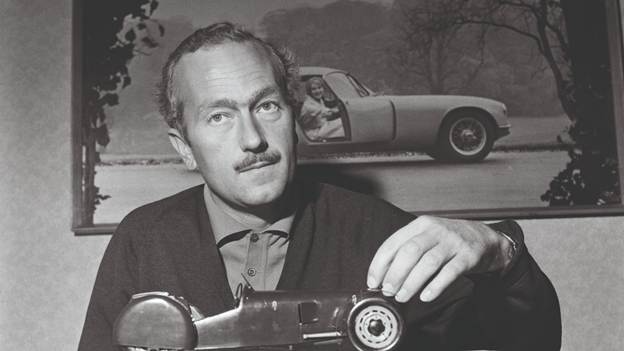
This quote was attributed – though like all good quotes, it’s difficult to pin down if and when he actually said it – to the mercurial Colin Chapman, boss of Lotus. It’s the distillation of a philosophy that a light car (at least a light racing car) is better. Keeping this simple is also a worthy goal – though in modern cars, it’s more likely that simplicity is a veneer of usability over a hugely complex system underneath. Chapman sailed too close to the wind on occasion when it came to the Lotus racing cars of the 1960s – they were light and simple, but a bit too fragile.

Lightness, however, is a virtuous circle.

In contrast, look what happens when a regular car gets bigger and heavier (because the maker is required to, or if the buyer expects lots of space and bells and whistles inside). It needs a more powerful engine to give it the same relative performance; that in turn might add even more weight and complexity. It will need bigger brakes to stop it, and the wheels will need to be bigger to accommodate them. The tyres will need to be wider to maximise grip, further adding weight and creating more resistance, thus reducing the impact of performance and reducing fuel economy.

This additional “unsprung” weight on each corner makes the car handle less well, so in order to deal with that and all the extra flab onboard, the suspension components need to be thicker and heavier. And so on…

Battery Electric Vehicles (BEVs) face a similar problem – people want a long range (measured in hundreds of miles between charges), meaning they need to fit a large battery (the Tesla Model Y’s battery is apparently over 750kg; that’s more than the total weight of a first generation Lotus Elise).

Because people want big, safe, comfortable vehicles (which are heavier) then either the effective range goes down or the battery size goes up. And when the latter happens, it takes longer to charge the car fully, even if only to cover the same distance. The battery is also the most expensive component in a BEV, so the price rises too. Trying to offset that extra mass by making the rest of the car lighter using exotic materials (carbon fibre and stuff)? Price goes up even more.

What we really need is a small, safe, lightweight (1 tonne), efficient (getting 5miles/kWh) EV with plenty of space inside and a 400-mile range. The downside? If that was possible today, it would cost a million pounds.

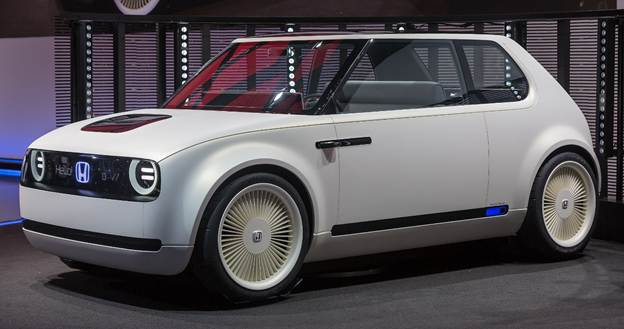
Some car companies have tried to make lightweight EVs but with limited success; Honda released the “Honda e” following rave reviews of their 2017 concept car, and it hit the brief – drove really well, not too heavy (around 1,500kgs) and packed full of style and cool tech.

Honda’s concept for the “e”
Article content

Cool tech does date quickly, though (Top Gear’s Chris Harris once said that buying an electric car is like buying a laptop in the 1990s … you just know that a better, faster, cheaper one will be just around the corner).

Also, small EVs tend to have low range – 100 mile maximum is not bad if you’re shuttling to and from your house and the shops or doing an average commute, but not so good if you have long journeys in mind. Honda dropped the £37K “e” after only 4 years; there are a couple of thousand in the UK so there’s at least some hope that when all that tech starts going flaky in 5-7 years’ time, that parts to repair them might be available.

So, what do we want?

As borne out by survey data, new car buyers increasingly want well-integrated technology in aspirational, safe and usable cars that are environmentally conscious and don’t cost too much. Sadly, these things are not usually complementary. Buyers are increasingly brassed off by massive slab screens in place of any buttons or proper controls, especially in supposed premium cars where the minimalist screen-forward feel looks a bit utilitarian.

The trend for large SUVs in place of regular family cars is getting some lawmakers’ attention too. The joke of the “Chelsea Tractor” is a problem in cities where space is at a premium. Paris tripled parking fees for vehicles weighing over 1.6 tonnes. Some campaigners in London are agitating for similar, and there’s pressure on the UK chancellor to overhaul vehicle taxation away from just emissions-based and focus as well on weight and/or size.

If these measures change what consumers demand from car makers, how long will it take them to design the cars that people want in future..?  Is it too late?

Next part – the shift to EVs

#778: Out of the box thinking IRL

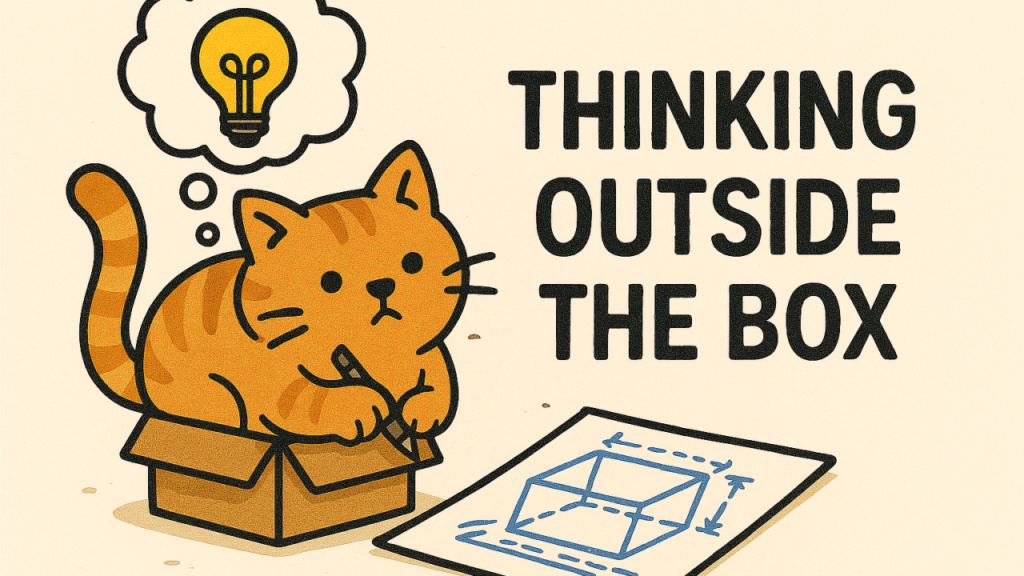
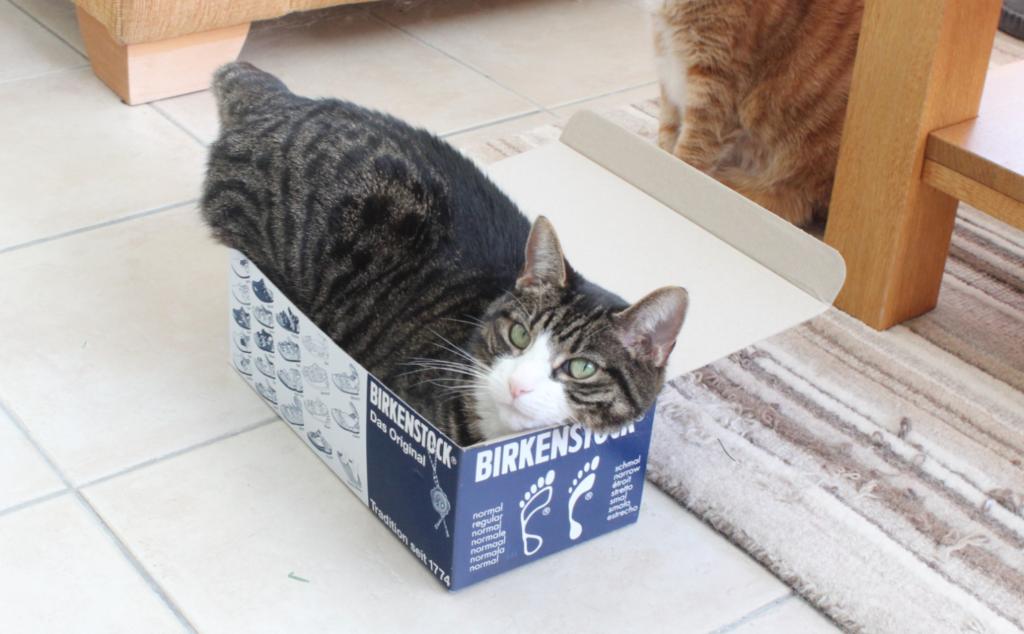
Cats love boxes, especially ones that are a little too small for them

Firstly – this is not “Tip of the Week”, it’s “Not Tip of the Week” since it isn’t Weekly any more. I have picked up from the last ever Tip of the Week and decided to carry on with its numbering. The goal is to do something occasionally, maybe monthly, and it will probably be longer form.


Analogies abound for scenarios where someone has a solution to a problem that was not necessarily foreseen because they looked at it from a different perspective.

A great one was coined by ex-colleague Darren Strange, when thinking about how smart people often approach a set of targets. As well as setting the goals, the authorities will lay down a set of rules by which they expect everyone to operate. Sometimes, playing fair and within the technicalities of the rules can yield bountiful results. Darren likened these clever people to the velociraptors in Jurassic Park – systematically attacking the electric fences designed to contain them, in order to find and exploit any weaknesses.

We should celebrate the velociraptors in our lives and find ways to think like they do. Without the killing and eating people bit. Obviously.

Making the <…> go faster

Some of the best examples of genuine innovating thinking is when coaches look to improve performance by focussing on making the environment better, or engineers are given a set of regulations and they come up with ways to “beat” the rules by using a new approach.

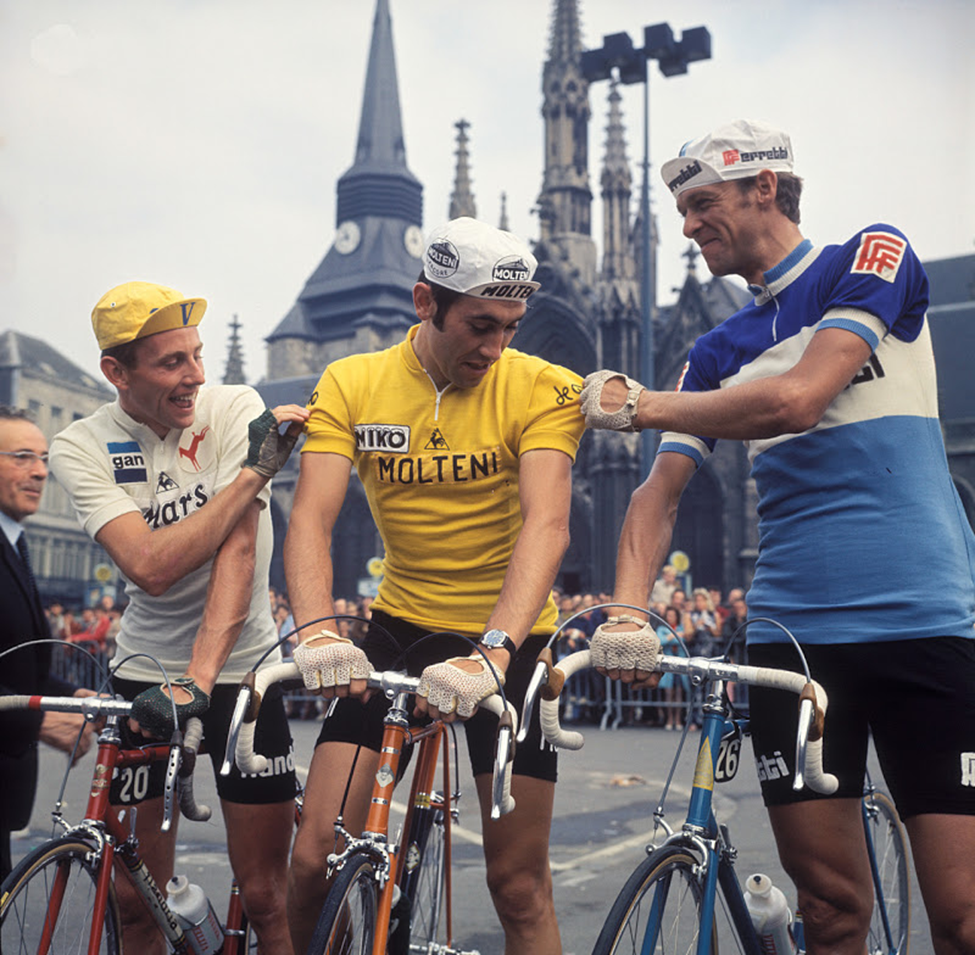
It could be a fanatical focus on the end goal (see Ben Hunt Davis’ “Will it Make the Boat Go Faster?”), or Dave Brailsford’s legendary “marginal gains” approach where a 1% improvement in every aspect compounds to make giant leaps in results. In some sports, innovators or engineers might concentrate on shaving off every gram of weight, such as was famously done in cycling by the legendary Eddy “The Cannibal” Merckx milling and drilling bike components to lighten them

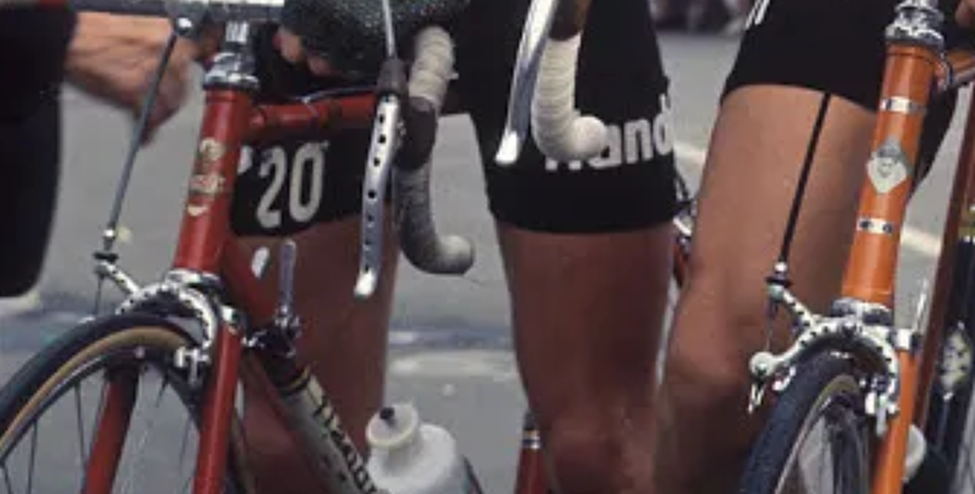
Merckx was famed for his weight-saving tricks, but he wasn’t alone – look at the brake levers and calipers of his competitor in white…
Article content
Article content

Motor racing is similarly obsessed with weight and performance, where millions of dollars could be spent chasing a fraction of a second per lap speed improvement.

The Professor

Talking of things automotive, one legendary velociraptor is celebrating 60 years in the industry this year: Professor Gordon Murray CBE. He was celebrated at Goodwood FoS and has appeared in various magazine specials. If you haven’t come across the Prof’s work, it tells a story of someone not like most of us.

Article content

Arguably most famous for one of the most impressive cars ever made, explicitly designed NOT to be a racing car yet almost forced by their customers to develop it for competition… and when they did, it won the hardest race in the world (The 24 hours of Le Mans) at its first attempt: the McLaren F1.

The Greatest Car … in the World

Top Gear’s Tiffany Dell reviewed it at length in 1992, and again 10 years later. Everyone, it seems, loved it.

Article content
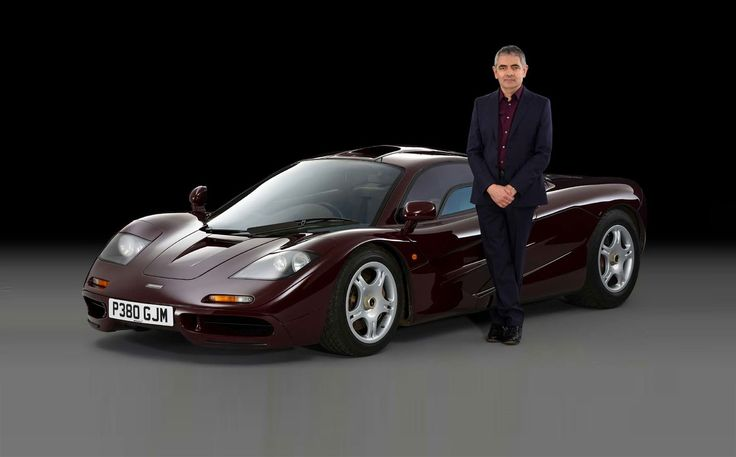
Mr Bean bought a $1M runaround

Well-known owners included Rowan Atkinson, who famously pranged his car leading to the largest ever car insurance claim in the UK at the time (costing nearly £1M). A certain Mr Musk got his in 1999 and binned it (while uninsured) a year later, showing off to Peter Thiel (apparently, he said “Watch this!” and then went straight to the scene of the accident).

You might think famous people have a bit of a habit of crashing F1s – Pink Floyd’s Nick Mason, custodian of the very first F1 GTR racing car came a cropper somewhat publicly in a track parade at Goodwood.

The F1 was unique and ground-breaking in so many ways, largely because Murray assumed the brief of making the best car in the world, bar none, whatever it cost. The driver sat in the middle because that was better. It was made of motorsport-grade materials so despite developing incredible amounts of power (627hp), it weighed not much more than a ton and was the fastest road car in the world for decades. Even the engine bay was lined in gold leaf because it was better at heat management.

At the time, the F1 was rare and arguably a commercial flop – it was £540,000 +tax when new, which in 1992 was a lot. That’s about £1.2M in today’s money, but one of the 64 road cars that were made would probably cost you £15M to buy today, if not more.

The Other F1

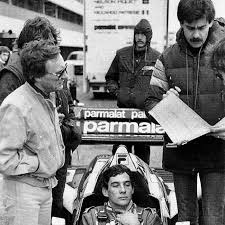
Gordon had cut his teeth in the Formula 1 industry, becoming the chief designer at the underdog Brabham team at only 26, promoted by its then new owner, Bernie Ecclestone.

Article content
Ecclestone, Murray and a driver who never got to drive for Brabham

Gordon went on to great things with Brabham and later onto McLaren, where his cars won ¾ of the races they entered. Bored with achieving everything, he went on to develop the F1 road car and has had some other notable successes more recently.

The Pit Stop

But one of Murray’s innovations from a decade before the F1 went on to have a seismic effect on the whole of Formula 1, and it was largely because he thought of something that hadn’t occurred to anyone else: using pit stops strategically rather than when something went wrong.

In recent years up to that point, when a car stopped in the pits it was because of a puncture or some other problem, which could take minutes to fix. Wheels were attached with nuts and wrenches, and coming into the pits was a surefire way of losing the race.

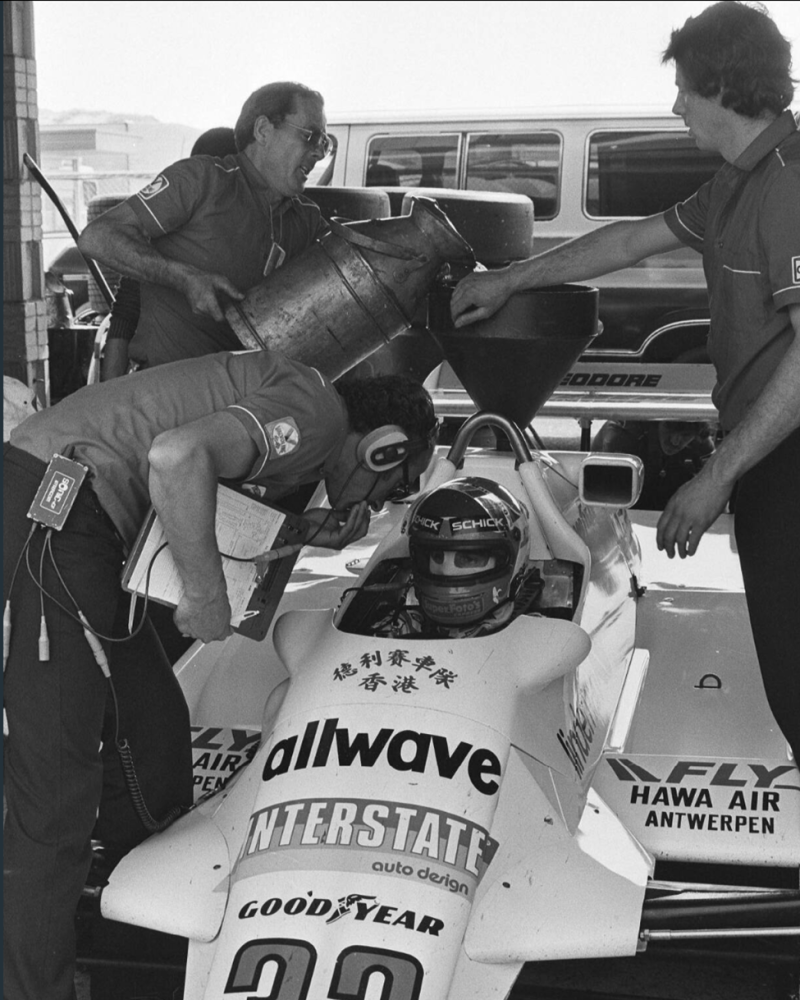
Some engines, like the new BMW turbo unit that Brabham was using in 1982, were especially thirsty and comparatively heavy, compounded by needing to carry the whole fuel load from the start. At that point, if cars needed fuelling during qualifying or testing it was slow and alarmingly basic – literally pouring fuel in from “milk churns”.

Article content
Jan Lammers during testing in 1982. Note the lack of any safety gear…

From the Dutch National Archives – http://hdl.handle.net/10648/ad1a9284-d0b4-102d-bcf8-003048976d84

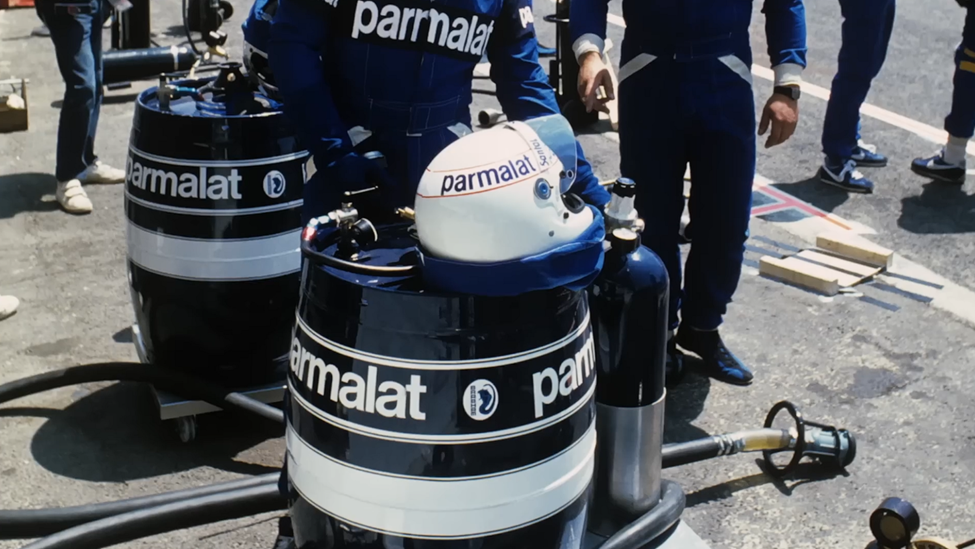
During the 1982 season, Murray’s team came up with an array of kit that nobody else had thought of – pressurised refuelling rigs made from beer barrels that could pump a whole family car quantity of fuel into a racing car in a few seconds. Wheel fixings and compressed air guns that could remove and replace a wheel in a fraction of the time it would have taken with spanners and brute force.

Article content

As well as being weighed down at the start of a race with a full tank of fuel, the cars only used one set of tyres during the race. Murray calculated that a car with less fuel (ergo, less weight) would be faster from the outset and its tyres would take less punishment. Also, by the time everyone else was lightened through having burned most of their fuel towards the end of the race, their tyres were worn out.

If the Brabham could pit half or even two-thirds of the way through the race and get nice new boots, they would be 2 or 3 seconds a lap quicker than everyone else. Doing the numbers meant that even if they lost 30 or 40 seconds bringing the car into the pits to add fuel and change wheels, they would make the time up by being faster all the rest of the time.

One problem was that when new tyres and wheels were fitted during the race, they would be stone cold and would take a few laps to get up to temperature and produce enough grip. The solution was to design plywood-carcassed, gas-fired “warming cupboards” that could keep a set of tyres nice and toasty.

The team tried it (not very successfully) from halfway through the 1982 season; their car was so unreliable that it barely ever made it far enough into the race to need a strategic stop.

Murray expected that everyone else would do the sums and turn up with the same technique the following year, but they didn’t. Not only that, but he designed the 1983 car specifically with refuelling and pit stops in mind (for instance, it had a smaller fuel tank) and with BMW fixing the engine reliability issues, they were much more competitive. Nelson Piquet went on to win the driver’s championship with Brabham, and the team came third in the constructors’.

Red Bull TV produced a great documentary in 2016 charting the development of the pit stop, and celebrating the modern efforts to reduce the time taken to replace all 4 wheels on a modern car – McLaren currently holding the record at a scarcely believable 1.80s.

Article content

Watch on Red Bull TV’s website – The History of the Pit Stop | How it came to F1. Red Bull TV also has apps for various Smart TVs; there’s also an unauthorised rip of it on YouTube, along with expanded interviews with Gordon Murray on the subject.

Read the rulebook, rewrite the rules

This out of the box thinking exemplified by Gordon Murray came because (he said) he read the rules cover to cover and inside out. He saw what the constraints were in his field of operation, and figured out how to do things that nobody else had thought of. Instead of looking at the rules as defining what he could do, he adopted the approach of finding things (within reason) that the rules did not say he couldn’t (see also the earlier Brabham “Fan Car”).

Even though the F1 authorities banned refuelling the following year, when they reintroduced it – in a more controlled, regulated fashion – in 1994, then the fuel and tyre strategy of every team became an intrinsic part of their race plans. Pit stop strategies can still decide race wins today (see Max Verstappen somewhat controversially winning his first drivers title in 2021, since he was on fresh tyres and his rival Lewis Hamilton was not).

The great velociraptor Gordon Murray and his team revolutionised the sport by thinking like nobody else.


Arnage (yes, that’s really his name, and sister Mulsanne was sitting behind) proving that cats don’t think outside the box

89 / 777: Into the Sunset

OK, OK, so we’ve been here before.

The “Tip o’ the Week” newsletter ran from December 2009 until June 2023 as an internal Microsoft email, before eventually making it online (here on www.tipoweek.com) and to LinkedIn (bit.ly/tipoweek) as well. That first stint went to 688 editions.

After a while, “Tip of the Week” became a part of a commercial enterprise, published by OnMSFT.com. That survived for 8 editions, before OnMSFT was acquired (by WindowsReport.com). A lack of confidence in the new keepers led to it reverting to a voluntary exercise on the previous channels, where it’s been since January 2024 over the last 80 posts. If we add up the “post Microsoft” 89 to the 688 from inside, that brings us to 777 editions. And that feels like a good time to stop completely.

Well not *quite* completely

Tip o’/of the Week will become just “Tip of the Whim(if you’ve a suggestion for a better name, then I’m all ears) – I’ll still do the occasional thing, when it’s warranted and when I feel like it.

Some thoughts on future topics:

Article content
  • How OneDrive is Driving One Crazy
  • Enshittification part II (and probably more)
  • AI tools that change the world even more than the last lot
  • Whatever happened to the hype of IoT?
  • Where the car industry might go next
  • The wristwatch – how is it still a thing?
  • Why is the Windows Photos app so bad?
  • Where is my flying car, and why is the future not like they said it would be?

Anyway, it’s the weekend (nearly). Why not re-visit my favourite Tip and give yourself something to look forward to?

Article content
Vesper. Once you’ve tasted it, it’s all you want to drink.

Thanks to everyone who has commented, liked, provided suggestions or even solutions over the years. See ya!

Article content

88: Drowning in a sea of AI Slop

Before diving into today’s missive, let’s think about amber. You know, the yellowy, fossilised tree sap at the core of the Jurassic Park story. It’s been an important commodity for thousands of years and used to be prized for its clarity and flawlessness.

Article content

In the 19th century, it became possible to synthesize amber. You can test for whether a sample is real or artificial, but it tends to damage or even destroy the sample and is time-consuming and expensive to do at scale.

As a result, a specimen of amber which looked like it had no flaws – the top tier stuff – was immediately suspected of being fake, and samples which had visible flaws and were obviously natural became more prized and potentially more valuable than perfect ones (though forgers got involved in other subterfuge). Real, natural and flawed became somewhat more valued than pristine.

Fake vs Real content

A parallel is perhaps looming in the world of Generative AI and the content it produces. It’s now so easy to rattle out a 1,000 word blog post with illustrations and even references to other sources, why should you believe that anything is produced by a person?

Article content
An example analysis of a LinkedIn “Top Voice” poster’s, er, “content”

Try using a tool like Quillbot’s AI Detector – paste some text in there and it’ll give you a score. Even supposedly trustworthy LinkedIn “Top Voices” are cranking out stuff that is largely AI-written. In some ways, it doesn’t matter – if the author isn’t a very good writer but they have good ideas, these tools could help them form the basis of a post.

But if someone is sending you email that is AI-written, sure it’s maybe more efficient from their perspective, but what does that say about how they view their interaction with you? Even using AI tools can get you in hot water.

Will AI start infecting itself?

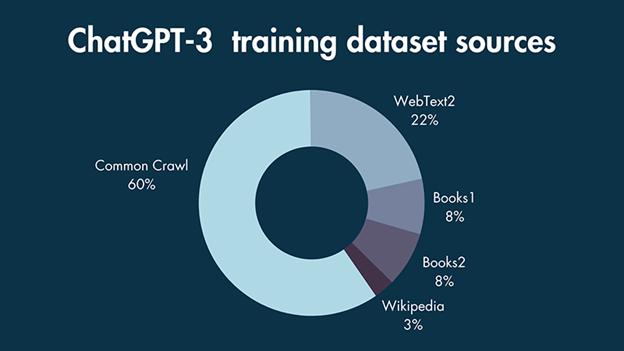
If much of the data that was used to train ChatGPT came from online sources, and even with models dipping into more traditional, copyrighted materials, at what point will AI start feeding on its own output?

Article content

Source – Style Factory Communications

AI Slop” is a term coined for the huge volume of AI-generated material that is of inherently low-quality (regurgitation of other people’s work, or stupid visuals which are nearer to Jackass than Day of the Jackal).

Internet search is starting to get less useful as AI-generated guff displaces real results. Two and a half years ago, an AI researcher from King’s College, London, was quoted in the MIT Technology Review as saying, “The internet is now forever contaminated with images made by AI.”

Research suggests that even 9 months ago, nearly 25% of corporate press releases were AI-generated. It might be possible to tell via Quillbot-type sniff-tests that something is written by AI, and moves are afoot (like Google’s SynthID) to mark stuff as having been AI-created. As creation tools get more sophisticated, however, will there be an arms race to know what’s real and what isn’t?

What and who to believe is getting harder

We’ve been living in a world of misinformation for at least 10 years; from shadowy organizations harnessing data in order to target a specific message to people on social media, all the way up to conspiracy theories where nobody apparently gains other than to shake things up. In civilized societies, we usually have at least one source of truth that we can rely on, rather than believing online whackos.

Leaving aside some lunatics who deride “Mainstream Media”, trustworthy outlets can be relied on to pass on balanced news coverage, and might even have teams like BBC Verify to cross-check sources.

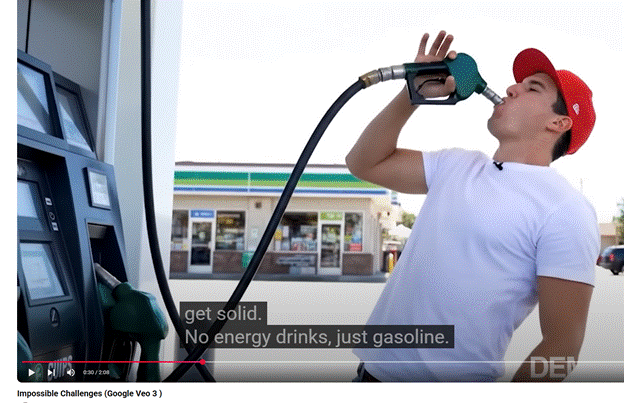
The excellent (and 100% human generated) Rest Is Entertainment podcast recently talked about Google Flow, a tool using their Veo 3 video & audio rendering technology.

Article content

source – YouTube – Impossible Challenges (Google Veo 3 )

Richard theorises that, very shortly, most short-form video content (like adverts or TikToks) will be AI-generated and that anything human-created might become premium.

AI tools can be thought of as akin to a calculator being used by an accountant or a digital easel being used by a great artist. The positive spin is that creative people will use these tools to make it easier: just as bedroom musicians can now produce hit singles that would have taken weeks of studio production, smart people with good ideas will use these tools to develop and release new content more directly.

Until the 1990s, it was seen – by some – as acceptable to put ground up bits of animals into feed given to (herbivorous) cows being reared for meat.

When next-gen AI tools are trained, let’s hope they know how to differentiate the nonsense that’s been generated over the last couple of years or they may get poisoned by the slop their predecessors created.

Article content

87: Sharing with QR Codes

Some inventions solve a relatively discrete problem, which has a hugely unforeseen impact on wider society. When Sir Tim was guddling about with hyperlinked documents in a basement in Switzerland, he could never have imagined what the WWW would become.

Similarly, the shipping container was patented as a way of making it easier to get stuff on and off big ships, but according to the Economist, had a greater impact on globalisation than all trade agreements in 50 years, put together.

Predating the big metal box, the humble Barcode arrived in the early 1950s, as a way of marking goods with a unique SKU (or Stock Keeping Unit for everyone who thinks SKUs only apply to software licensing), though the idea had other uses – in the early 60s, British Rail successfully scanned rolling stock travelling past at 100mph using a system of metal plates.  

The barcode is simply a way of making it – supposedly – easy for a machine to identify the thing; its most commonly used scenario is, of course, the supermarket where the codes are all scanned at checkout. Mildly sweary comedian Eddie Izzard joked about it nearly 30 years ago though nowadays many of us are familiar with self-checkout and all the joys they bring.

1D to 2D

The 1-dimensional barcode is simply a way of representing a single number using a variety of lines that can be read by a light. As image processing technology advanced, Japanese motor parts giant Denso (variously connected with Toyota), came up with a system of labelling parts using smaller, square codes that could be scanned from any angle and even had some error-correction built in so if the lighting was poor or the label had been damaged, it still had a chance of being read. Importantly, a single 2D code can contain a lot more information – initially used to hold the individual SKUs or serial numbers of every component in a bigger box, making it easier to bulk-manage automotive parts.

Denso Wave Inc still owns the patent behind (and even the Trademark of) the QR (Quick Response) Code but generously doesn’t try to gouge a royalty from it, like many others might.

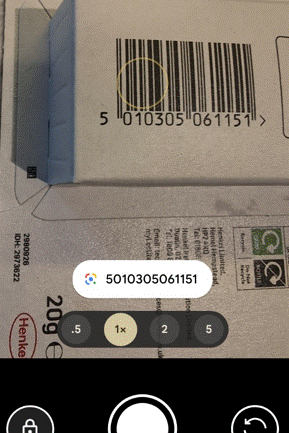
It’s not uncommon to see tiny stuck-on QR code labels on all kinds of auto parts like spark plugs; you might see them included on event or travel tickets, or anything that just needs a numerical ID Try reading them with your phone camera and all you’ll probably get is a number, just like if you point the camera app at a regular barcode.

Contemporary uses – URLs

A handy benefit of the extra capacity of QR odes is their ability to represent a URL. Perhaps the most-used is when you see a poster promoting some service or app (especially in captive environments like on trains or in airports), and it has the QR so you can download that app or connect to that site right away.

Reading the code is easy – at one point, a separate QR code reader app would be required but now with the camera apps on iOS or Android, you should be able to scan the code by just pointing and tapping on the pop-up.

Do be careful, though – generating QR codes is simple and there’s nothing stopping a nefarious sort from printing their own labels and sticking them on things, luring people to following a link to the wrong place. If the destination URL looks dodgy, don’t go through with it.

URL shortening services are handy, with or without QR codes. Sites like tinyurl.com or bit.ly give you a useful way of taking a huge URL – like a link to a document or photo in OneDrive or Google Drive – and making it shorter and/or more memorable. An example is bit.ly/tipoweek. Bit.ly also offers the ability to generate customized QR codes.

The risk with any URL shortener is that it’ll go away – both of the above examples have been around for years but if you encode a short URL into a QR code then you better hope it doesn’t change. Google famously announced the death of its own “goo.gl” shortening service, the axe on which comes down soon. Link Rot is a real thing. Also, having a URL fronted by a shortening service doesn’t necessarily give the user the confidence that they’re not about to be redirected to some site of disrepute.

Microsoft uses its own “aka.ms” for stuff that it wants to direct to, but many of the links are created and owned by individuals – so if you’re following one that was set up by someone who’s no longer there, better hope that it has been adopted by someone else or you’ll end up in Bing.

QR Codes are Ugly and Boring

There’s no getting away from the fact that QR codes are a bit of an eyesore; but they don’t need to be very big to be scanned using a modern mobile phone, and the error-correction functions mean you can add a lot of stuff to a QR code without fundamentally breaking it.

Some advertising can discretely show a code…

… or could add their own logos and other flairs. Here’s the bit.ly/tipoweek QR with extra pazzaz, courtesy of QuickQR.Art…

There are various paid-for online services which will generate fancy QR codes for you – don’t try and rely on Copilot or ChatGPT to take an existing QR code and jazz it up – their predilection for moving stuff around in images will almost certainly destroy its scan-ability.

Microsoft Tag Nuts and QR Wins

A researcher in Microsoft came up with a similar idea but using coloured triangles to offer a more visually arresting and more data-dense equivalent to the QR Code.

Tag didn’t last long; within a few years, it was put on death row. Even at the time, marketeers were predicting the death of the QR Code because none of the mobile platforms had native support, so you’d always have to use a 3rd party app, thereby denting its appeal.

The Tag platform limped on but was eventually killed by its acquirer, 10 years ago. In the meantime, the mobile camera apps added QR Code scanning functionality so it’s more mainstream, and the pandemic saw a bump with bars and restaurants asking people to scan a code to order their scran online.

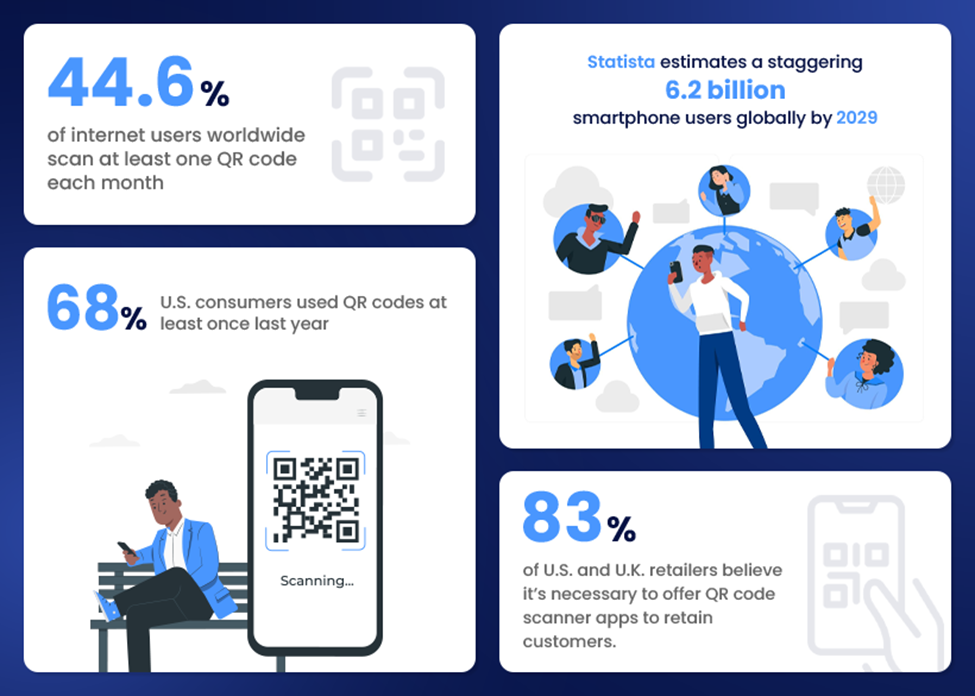
[source – QR Code Statistics for 2025: Usage, Trends, Forecasts, and More from qrcodechimp.com]

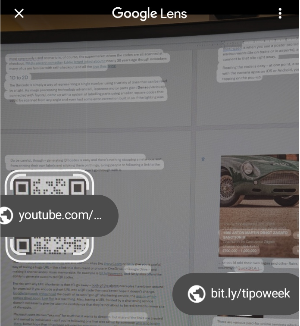
Even if you take a snap on your mobile phone camera, you might be able to go back in and look at the QR ode if there is one. On Google phones, open the photo using the Photos app and select Google Lens to scan it for QRs.

On a desktop, copy the image to clipboard, go to Google.com and click the lens icon A white rectangular object with a black text

AI-generated content may be incorrect.

Then paste your image into the resulting page, and you should get the QR code resolved. FWIW, Bing images offers none of this.

Quickly Sharing a site with QR

Though QR codes can be used to do all kinds of things like join a WiFi network or start a mobile app, the bread-and-butter use is to share a website URL.

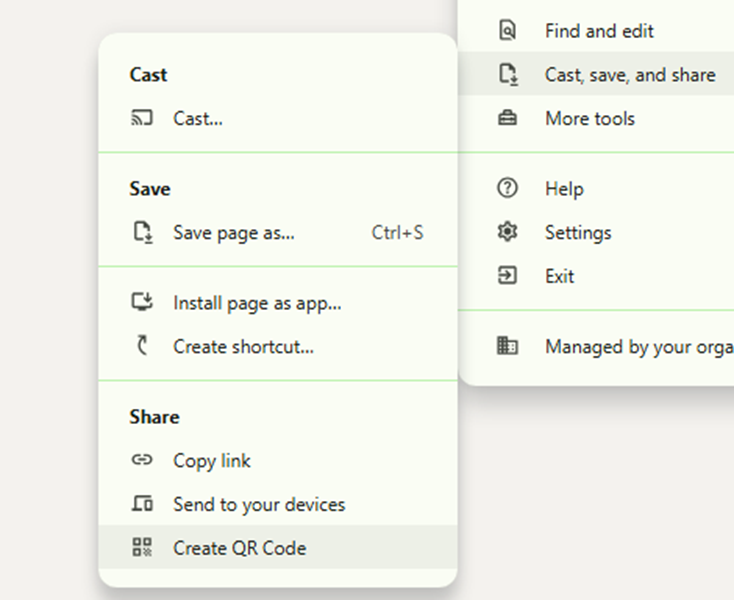
Chrome will let you generate a QR code by going to Settings -> Cast, save and share

You could add the “Create QR Code” shortcut to the toolbar if you find yourself doing it a lot.

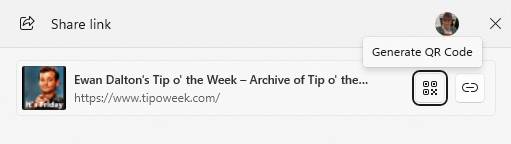
Edge lets you do a similar thing, though can get to the QR Code bit more quickly by clicking the Share icon on the toolbar, or via the menu at Settings -> More Tools -> Share.

These could be useful if you’re building a presentation and want to share things with the people in the room, or have them contact you at the end. Even if presenting via Teams/Zoom, the QR codes can be scanned from a user on a PC at home so are worth including, especially for short URLs which won’t change (even if the thing they redirect to does).

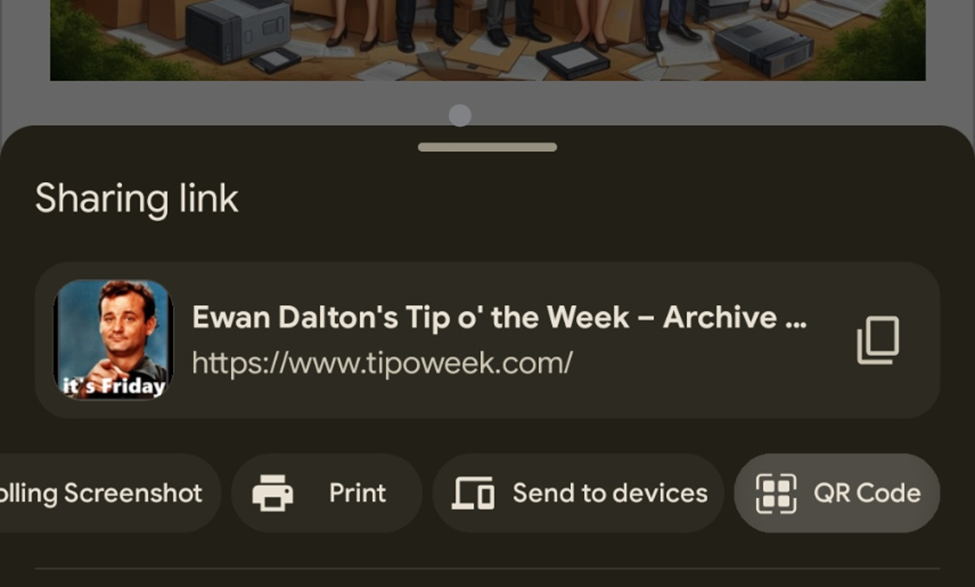
Maybe the most useful way of QR sharing is when on the mobile; you want to quickly share a site with someone else on their phone. There are, of course, any number of ways you could do it, but on both mobile Chrome and Edge, go to the Menu -> Share and it’s right there…

Get the recipient to fire up their camera and click on it, and they will be on the site shortly.

LinkedIn Sharing

Even easier, if you’re at some networking event and you want to share your LinkedIn profile with someone (to show them how super-proud and humbled you are to be there), go to the Search box at the top of the app and just tap once in it – then the QR icon appears. Tap that, and bingo!

86: Finding your F… Files

Computers have dealt with files of many types since the earliest days. When the Graphical User Interface took off, it was even seen as a step forward that you could navigate to a file and double-click it to open the application that created it, rather than having to start your word processor and go to File->Open to access a file.

As storage prices have tumbled ($76M/TB in 1985, $6K/TB in 2000 and $11/TB today), and cloud storage has become the default to some extent, then it’s inevitable we all have more stuff, photos, videos, Office documents and more. But search capabilities have not necessarily kept pace, on Windows at least.

Windows Search

There is an indexing and search feature built into Windows, and has been since Windows Vista for desktop users. It is an evolution of the previous Indexing Service which goes back to NT4 days; basically a background service will notice when files change, and can pick up the data and scan it for keywords.

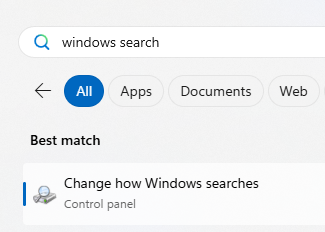
In principle, you’re supposed to be able to type a search term into the Start menu or the search bar on Taskbar if you have it enabled, and it will find files which contain that word or words in their name, or even in the contents. It’s also used to search Windows own system and settings, so is often the quickest way to get to anything you’d like to change or tune.

The downside is that Windows Search is a little, er, opaque. It can take a while to index lots of content, and if it doesn’t find something then there isn’t much you can do other than try a few switching-it-off-and-on-again tricks before ultimately blowing the index away and recreating it.


Enter File Search

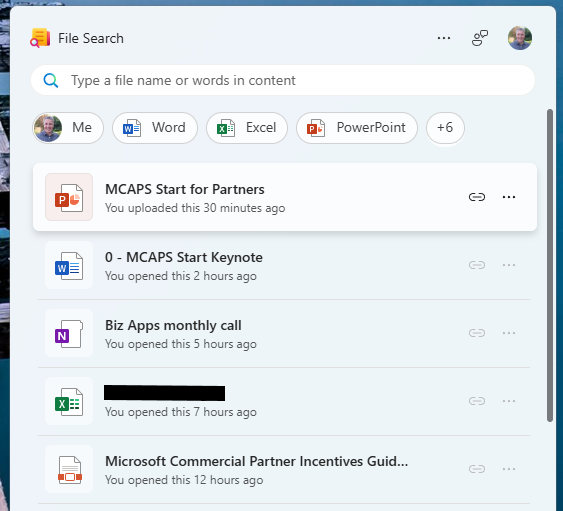
Microsoft has started testing a new M365 “companion” app called File Search, which is used to search files in OneDrive (and only in the M365 commercial OneDrive too, it seems).

It’s pretty quick and does a decent job of finding stuff, as it offloads the actual indexing and searching to the OneDrive service itself. The app itself is a web app running like a Windows app.

When installed, it (annoyingly) starts up at Windows startup; something that can quickly be nixed with the settings menu on the top right. It’s one of a few new companion apps that do other stuff in M365, only one tenant that you’ve signed into (and not working across Microsoft 365 Family as well as M365 school or work accounts, and not working with (MSA) Microsoft Accounts).

Find Everything – well, most things

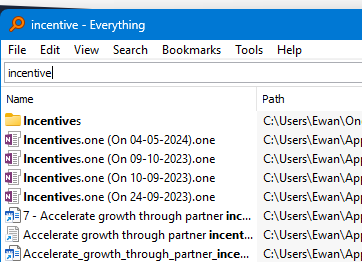
If Find Search is limited to only stuff that lives in the (M365) cloud, a powerful, free, local application called Everything which searches all the files on your PC could be just what you need.

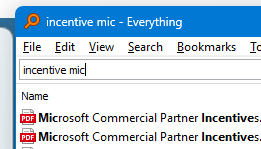
It searches file names only and starts showing you results as you type, and a quick double-click on the results will have the target file open in a jiffy. There is a preview pane too, so will quickly show you what the file looks like. Everything can search the contents of files too, but since they’re not indexed in advance (and with all the overhead that implies), it’s super slow to give results. Best avoided, really.

The app looks basic but is very fast, and the website looks like it came straight from the AltaVista search engine. Still, it works…

85: Transcribing Online Videos

We’re all busy. Who has time to watch training videos, recordings of online conferences and the like, without skipping the blah blah and getting to the point?

What if we could use cutting edge technology to give us more time to do the things we really want to be doing?

Some online videos have a transcript already published – on YouTube, for example, it’s an option hidden in the description, if the publisher allows it. Clicking the Show transcript button will then display a text stream of what was said, with timestamps alongside.

It’s not searchable, other than by using the browser to try and find text on the page. In the case of YouTube, though, it’s a handy way of jumping straight to a keyword in the video.

If you can get the transcription, you can get it summarised. Why bother wading through hours of corporate chiff-chaff if you could get the tasty bullets extracted for you?

But that’s not what we want.

Take One – the live video

Live broadcasts don’t publish the transcript; clearly, they can’t know what is going to be said and when. Maybe they’ll have live subtitling but that’s tricky to do anything with until after the event is over.

“As live” stuff like corporate events such as Microsoft’s recent MCAPS Start for Partners often don’t make the transcript available ahead of time. Watching these kinds of things in real time, there is one natty technique to get a transcript, even though it does have some shortcomings.

Using Teams, go to the Calendar view and start a new instant meeting…

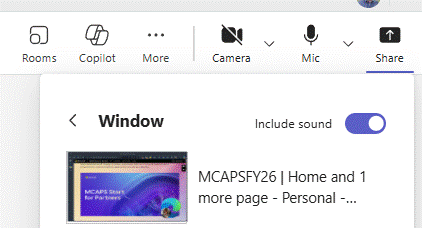
Once joined, you’ll be the only participant and also the meeting organiser. Now Share the browser tab that is displaying the live video with your meeting; share just the window and make sure you’re including sound (so the sound from the window is getting picked up by Teams).

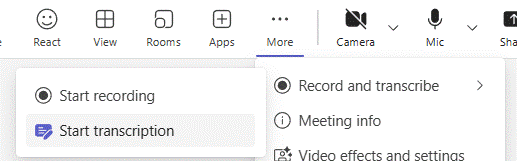
Now, you’ll be able to Start transcription and Teams will record everything that’s being said.

The downside is that everything is noted as coming from you (since it won’t know who is speaking in the real video) and some jargon might be messed up repeatedly. When the meeting is finished, you should be able to look at the Recap feature and locate the transcript.

Download the text to a Word doc and you’ll be able to do some simple editing like find/replace for common mistakes (in the MCAPS event, “FY20 6” cropped up instead of FY26, or “SME and C” instead of SME&C), and maybe even add in the names of speakers at different points if you know them.

The transcript can be fed to your favourite AI tool later to summarise it. More on that later.

Take Two – the replay of video

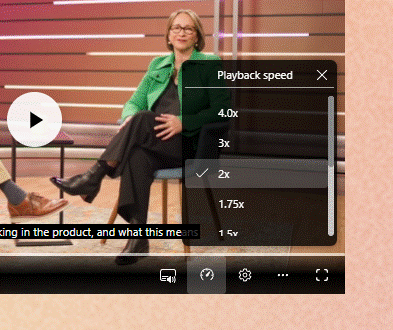
Other training vids etc might be published on-demand, and if they avoid sharing a transcript too, it’s still possible to use the same technique as above to capture what’s being said. You might even be able to alter the playback speed so you can capture the text without investing the actual time to watch the video …

Chances are that 4x playback will be a bit too fast for the transcriber to catch its gist. Stick to 1.5 – 2x and marvel at your own genius.

Take Three – they published the transcript!

Oh, frabjous day! If your video of choice does have a published transcription, it’s likely that it will have correct speaker names, and the creator may have tidied up any mistakes in capturing jargon or abbreviations.

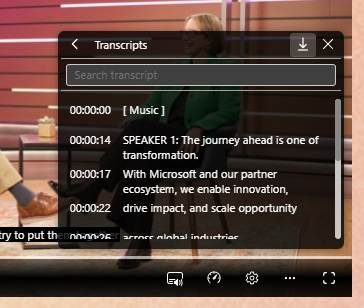
In the case of the Microsoft MCAPS Start event referenced earlier, they did share the transcript as a .VTT file, a format used to define subtitle displays so it’s very chopped up and has timeline information too. Not easy to read, particularly, but we can overcome that.

Click the option on the control bar and you may see Transcript options; in this case, you can search for a keyword and jump directly to that point in the video, or click the little arrow to download a copy to a VTT file. It’s just a text file that can be opened in Word or Notepad if you insist; it would be worth saving it to your PC and renaming it to something.txt.

Feeding the Copilot

In this example, however you’ve arrived at a transcript file, lucky subscribers can use M365 Copilot to make it summarise the information. ChatGPT would surely do similar, and as long as the video is in the semi-public domain, there’s no worry about sharing all your secrets with OpenAI.

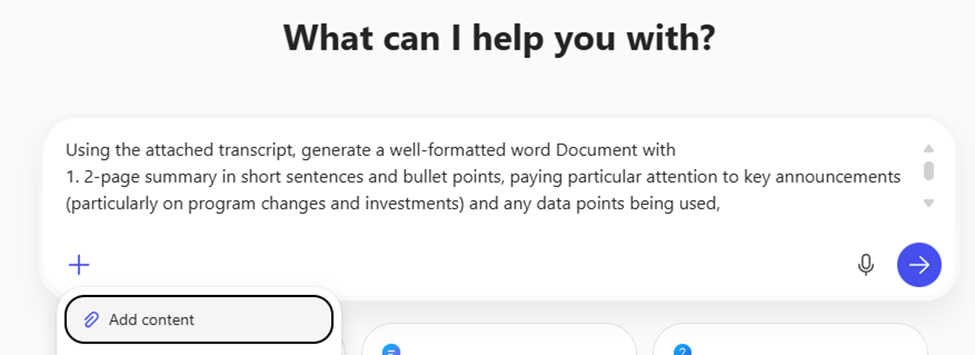
Here’s an example prompt for Copilot:

Using the attached transcript, generate a well-formatted word Document with 1. 2-page summary in short sentences and bullet points, paying particular attention to key announcements (particularly on program changes and investments) and any data points being used, 2. A 4-page summary of the key themes, any calls to action and take-aways from the content. 3. the actual text of the transcript ordered neatly into paragraphs of English, highlighting speaker names in bold.

Paste this prompt into copilot.microsoft.cloud and click the + icon to upload the .TXT or .DOCX transcription file you have already saved.

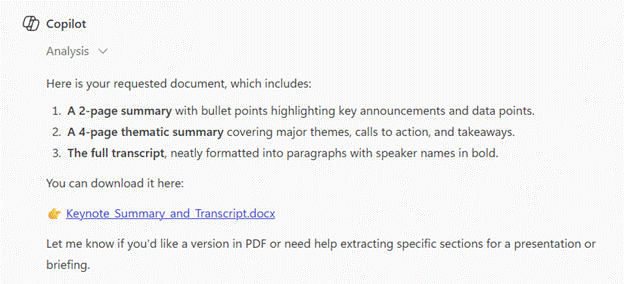
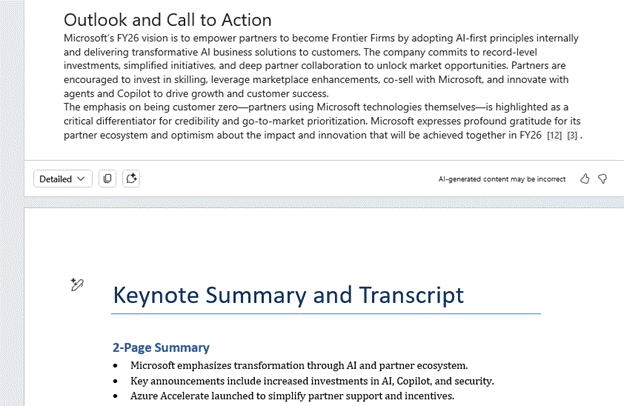
Give it a short while and you should get the document ready to view…

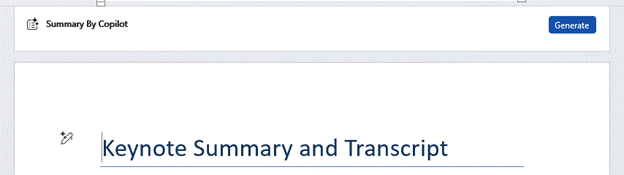
Using this prompt gives a short bulleted version, but asking Word to generate a longer summary in Copilot within the app might also provide a useful bit of readable text at the top, too.

You can tweak the level of detail with the drop-down menu on the lower left fo the Copilot option in Word. Selecting “Detailed” in this example will give a 2-3 page summary of the hour-long transcript, well formatted and easy to read.

Result! 😊

84: Keep on Running

When Windows 95 appeared almost 30 years ago, it made a big thing about the Start button and the menu that went behind it. The Start button on the screen – and on the keyboards of newer PCs – was the way to quickly get to everything.

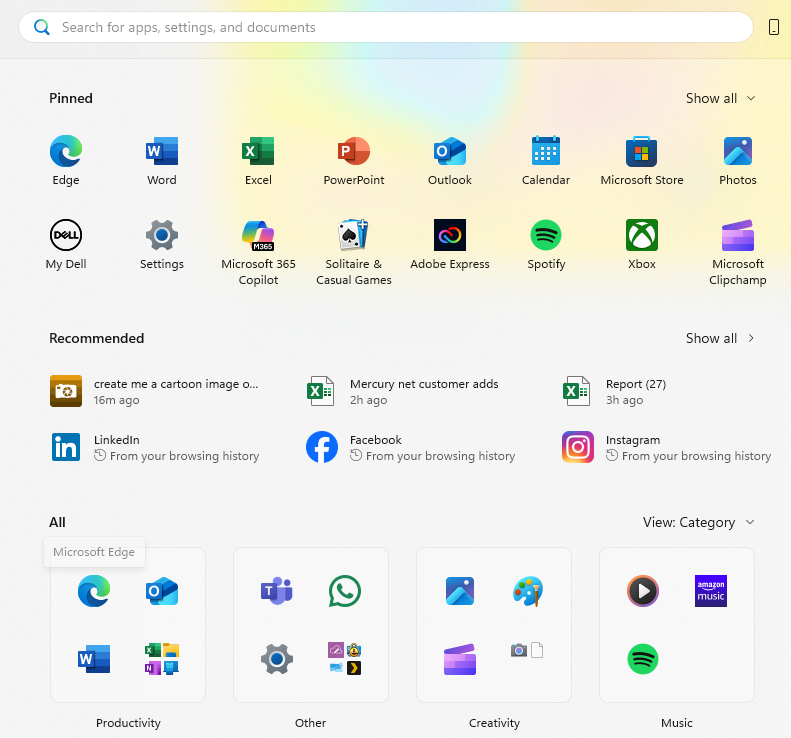
Fast forward to today and the Start menu is visually more arresting and comprised of different categories of icons. At the top are Pinned applications (which may or may not be things you’ve pinned there; Microsoft or other app providers might have decided you want them front and centre). Then there are apps or documents “Recommended” due to your usage habits.

Microsoft is still tweaking with what to put on the Start menu: there’s a new update coming which includes categories of apps, too.

The problem with any arrangement of icons is that when a user goes to access something, they need to figure out where the icon is; frequently used apps might get pinned to the Taskbar for easy startup via muscle memory, so the actual Start menu is infrequently accessed for day-to-day apps. Also, many people live in the browser so they might never need an app to be invoked through an icon.

Start to Run

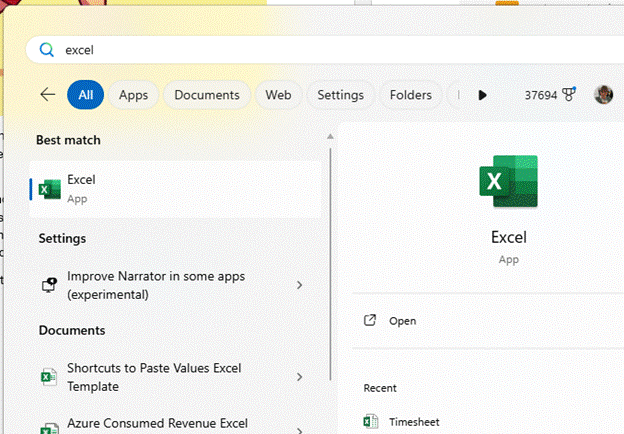
A more consistent way for launching an app might be to press the Start button then begin typing the app’s name. If you don’t have Excel pinned to your Taskbar, for example, it could be quicker to just press Start and typing excel <enter> to launch, than pressing Start and fishing about with your mouse to find wherever the icon is.

The same UI promises to help find documents you’ve used too, so if you know what you want to open with Excel, you could try that instead (eg timesheet…).

Hardcore Runners

For true keyboard warriors, there’s no better shortcut than WindowsKey+R, which launches the simple Run dialog. Generally speaking, you need to know the name of the program’s executable if you want to fire it up from here – eg. Entering “word” won’t get you anywhere, since Microsoft Word is actually winword.exe.

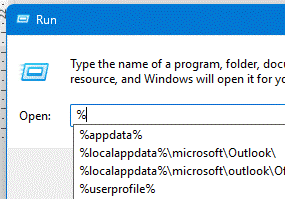
It does keep a useful Most Recently Used list of commands and some Autocomplete logic, though, and entering the name of a folder will open that in Explorer.

There are lots of built-in variables that can jump to places in Windows:

  • %userprofile% is your own home directory
  • %onedrive% jumps to wherever your main OneDrive folder is.
  • %windir% takes you to Windows own director, and can be combined with others like %windir%\system32

To see the full list, drop to a command line and enter set. Everything in the list could potentially be used if you strap a % in front and after it.

Ultra Running

If the Win+R command is too namby-pamby for you and you prefer not to take your hands off the keyboard, there’s another super tool that’s part of the PowerToys package – PowerToys Run. Arguably not really a “Run” or even a “search” function, it provides both with a slew of additional commands and features that can jump straight to different parts of Windows.

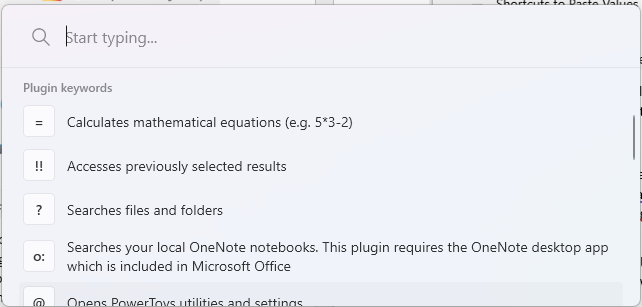
Press the shortcut key sequence to launch it (as long as PowerToys is running in the background), and you’ll get a floating window right in the middle of the screen. There are quite a few “operators” which direct it to search, from using the keyboard to loop through the current windows, to searching OneNote.

Somewhat controversially, PowerToys Run uses the ALT+Space keystroke which diehard keyboard bashers will know is the shortcut to the Window management menu accessed from the very top left of every Window since 1985.

Fortunately, PowerToys Run can have its invocation re-assigned to, say, WindowsKey+SPACE.

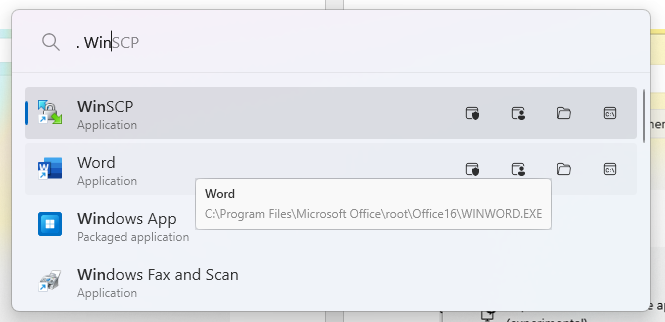
Start a command with “.” and type the name of an app, and you’ll get a suggested list – not just from the app’s name but from its executable, so you could quickly see what to enter into WindowsKey+R in future, for the sake of saving a few seconds.

83: Exporting contact info at scale

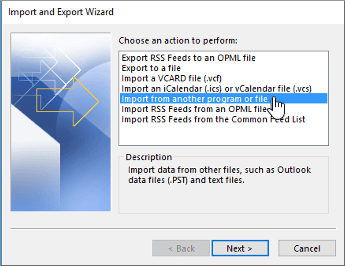
Every email or productivity application which deals with contact info has some attempt at being able to sync, export or import contacts from elsewhere. “Attempt” being the operative word as you’re often left with a flat text file (or CSV) which might need some form of manipulation before it can be imported. Using Export & Import could be the simplest way of copying contacts from one account to another, or even cleaning up duplicates by exporting / fixing / deleting from the source / re-importing.

GMail supports importing CSV data or individual contacts in the form of VCF files, if you have them. Export to CSV is the norm too.

New Outlook and Outlook Web App have a simple mechanism for CSV import/export …

Article content

… while Outlook (classic) has a UI which hasn’t changed much in the last 20 years:

Export from company address book

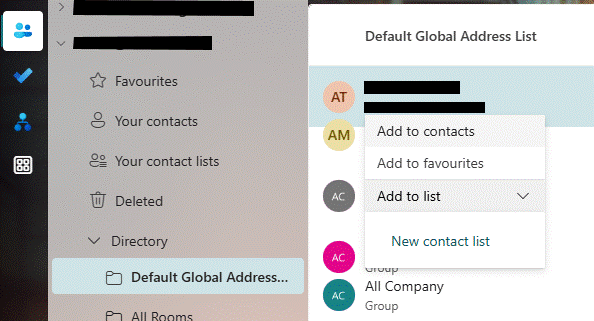
What if you want to batch-export a load of contacts for colleagues from your company’s address book? Let’s say you’re a group going away on a conference and you want everyone’s number so you can keep in touch? If you’re using Exchange Server on-premises or Microsoft 365 for email, then there’s a “default Global Address List” which has everyone in it. It might also have phone numbers, job title, department and other info, besides just a name and an email address.

Using New Outlook or Outlook Web app, you can only really operate on a single entry at a time, so it could be a drawn-out exercise to pick everyone you want and copy them to your own contacts.

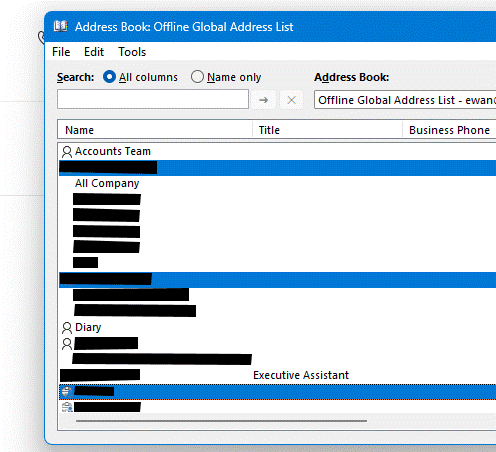
It’s pretty easy using classic Outlook to add multiple contacts from the GAL. Open the Address Book (another piece of UI which is largely unchanged since the original Exchange client released over 30 years ago); SHIFT+CTRL+B is the fastest way to fire it up.

Hold the CTRL key down while you click on multiple names, then right-click on one of the selected ones and choose Add to Contacts. So far, so good. But what if you wanted to add dozens of contacts from Aaron to Zebedee, and you had thousands of entries in the GAL? It could be a bit of a faff to scroll, multi-select then Add to Contacts. If only there was another way.

Exporting the whole Offline Address Book

Speaking of faff, here is one technique which will export everything to a CSV file and then let you filter, sort and ultimately export just the stuff you want. You might be able to do other things like take a snapshot at quarterly intervals, then use Excel to compare the CSVs and see who has joined, left or moved department, changed job titles and so on. Quite Interesting, no?

The source of this goldmine is the Offline Address Book which Outlook (classic) keeps on every PC that’s connected to an Exchange/M365 mailbox, so the user can still see the address list when they’re offline. Now this technique isn’t necessarily for the faint hearted, but at least you only need to do the bulk of it once and then run a simple script whenever you want to extract the data from the latest OAB. It’s not exactly rocket science.

The OAB is held in a bunch of files on your PC’s disk; the format is uncompressed so if you’re foolish enough to open in, say, Notepad, you’ll recognize some text but there’s a lot of other stuff in there. Fortunately, some enterprising techies have pulled together a script that quickly rips through an OAB and delivers a neat CSV of users, and another of groups or mailing lists.

Step One – Install Python

OK, this would send most people running for the hills, but on a Windows PC it’s reasonably straightforward (and for the purposes of the rest of this example, we’re assuming you’re running Windows – if you’re a Mac or Linux user then you’ll need to figure it out on your own). As said, this is a one-off activity, to install both the Python scripting language, and the oab script that we’re going to run later.

Unless you’re already a Python developer, start by going to Python 3.13 – Free download and install on Windows from the Microsoft Store, hit the Install button and sit back for a bit.

Once the install has finished, we need to use a package manager called pip (no, not him) to find and install the oab script.

Start a command prompt by pressing Start and entering cmd, then in the command window, simply enter:

pip install oab

You’ll see a bunch of semi-scary looking warnings; none are really important other than one which is likely saying:

WARNING: the script <name> is installed in ‘<long directory name>’ which is not on PATH.

It will be easier to run these scripts if you add that folder to PATH. Carefully select all the text of the long directory name between the ‘ ’ marks, and right-click on it. This will copy that text to the clipboard.

Now enter, in the command prompt:

Set PATH=%PATH%;<right-click to paste the text copied>

eg.

This will mean in future, you can run the “oab” script from anywhere. Test that it works by just entering oab in the command window, and you should get a list of all the available options to run that command.

Step Two – Find your Offline Address Book files

Once you have Python and the script installed, you’ll only need to run steps two and three if you want to subsequently go back and re-extract data from the latest Offline Address Book.

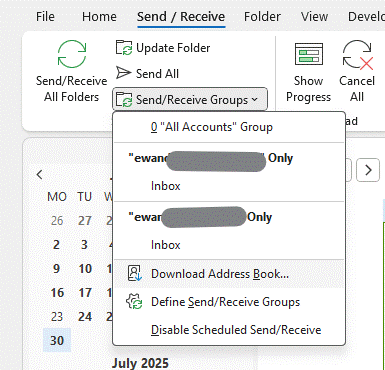
The Offline Address Book (OAB) is built on the Exchange Server or M365 service, usually every day. Outlook (classic) can download on demand, or it tends to pick the latest files up when it feels like it. You probably want to force it, by going into Send/Receive and choosing the option Download Address Book. Keep an eye on the status text in the bottom right of Outlook to see if it’s still downloading stuff, and when it looks like it has finished then proceed.

Now, the trick is to find not only the most recent OAB files, but the ones which correspond to the account you’re interested in; if you have Outlook set up (as in the case above) to connect to several M365 accounts, you may have to try a few times to find the right one – but if you’re in a megacorporation with 500,000 entries and the others are your M365 family subscription etc, then just look for the biggest file. Of all the different files that comprise the OAB, the one we want is udetails.oab.

The OAB files are stored in a deeply buried location which can quickly be found by pressing the Start button or Windows Key, and entering:

%localappdata%\Microsoft\Outlook\Offline Address Books

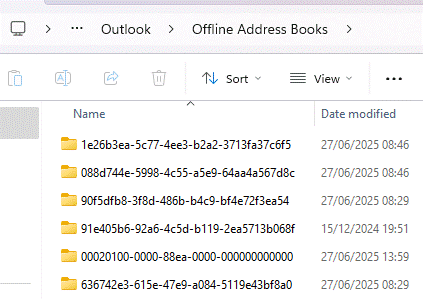
You’ll end up with one or more folders with a GUID for a name; open each one in turn and look for a file called udetails.oab in the most recent folder(s).

Copy that file – assuming it has a recent date/time and looks sufficiently large (a 1,000 user company is going to be in the 1MB-2MB size, probably; Microsoft or Amazon will be more like 1GB) – to somewhere that’s easily accessible; why not try c:\users\<yourprofile>. You can get to that location quickly by pressing Start again and entering

%userprofile%

To prevent getting in the way of all the other stuff that’s in your user profile, you might want to create a folder (let’s call it oab) and drop the udetails.oab file in there for later perusal.

Step Three – Extraction

Now we have the latest OAB data file, it’s a simple matter of pointing the script at it.

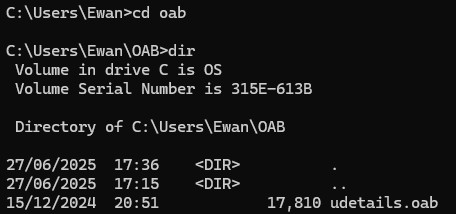
Start by dropping to a command prompt (press Start and enter cmd) then changing directory to wherever you put the file; if you dropped it into %userprofile% then the command prompt will probably start there. If you put it in a subfolder, or somewhere else, then you’ll need to use cd to change directory (and possibly dir to check it’s there):

Now, from the command prompt, enter the following command to invoke the script to do the work (it is case sensitive so take care):

oab -C -o oab udetails.oab

If your OAB file is 100MBs in size, this might take a few minutes, but if more modest it’ll be a snap:

Now open the oab.users.csv file in Excel, select the whole thing, select Format as Table from the toolbar, tell it that your data has headers, and you should be easily able to filter out the rows you want to keep, delete the rest, then import them back into Outlook as personal contacts. Or do whatever else you have in mind.

As described earlier, to repeat the process in future, just update the OAB, grab the latest udetails.oab file again and re-run the script as per steps 2 and 3. Whatever you do with the resulting files, just make sure you do it responsibly.