 The first major update to Windows 10 – known variously as the November Update, Threshold 2 (TH2) or the Fall Update – is now making its way out to users via Windows Update. The update brings new features , bug fixes and some under-the-covers management functionality to enjoy.
Any Brits who grind their teeth over the use of “fall” (now a North American term, where the rest of the English-speaking world still refers to the season as Autumn) might want to know that in the 17th century, the season was known in Britain as “fall”, but only became “autumn” through the Latin/French influences after the American colony had been established. So there.
If you’re patient, you should be offered the update via Windows Update (if a home / non-domain-joined PC), though if your Windows 10 PC is run by your company, there may be a managed deployment of the upgrade.
If you’re less patient, and you’re not using Windows 10 Enterprise, then you can force the update by re-running Windows Setup – it’s a bit of a palaver as you’re essentially running a full re-install of Windows over the top of your existing setup, although all your settings, files, applications etc will be maintained. If running from home, best allow a couple of hours.
Go to the Get Windows 10 page, click on Upgrade now and go through the wizard just as if you’re upgrading from Windows 7 or 8 to Windows 10, even if you’re already running Windows 10. This  process uses the most up to date version of Windows 10 – the November update, included – to run the setup and to upgrade whatever you’re running already.
There are lots of new features in the November Update, such as a “Find my Device” function in Settings -> Update & Security. There are other improvements to Cortana, Tablet mode, Edge, and Skype. More fodder for another tip or two.
The November update brings Windows 10 to version 1511 build 10586 (where, according to Paul Thurrott, 1511 denotes the year & month of the major release). If you’re not sure which version of Windows you’re running,  try typing ver at the Start menu, and choose the “See if you have …” option – or visit Settings | System | About to see the current version & build.
 Only after the November update will you see the “Version” & “OS Build” details appear. This should be an indicator of the pace of major updates – if “Threshold” (aka Windows 10 RTM) was effectively version 1507 build 10240, and TH2 is 1511, then who knows when RS1 (or “Redstone 1”?) will arrive?
Another quick way of getting the same kind of info is to run winver at the Start menu.
Or try msinfo32 if you want an old-school look at your PC’s software and hardware config.
 So,ToW reaches its 300th weekly missive. In the first weeks and months following the inaugural ToW,

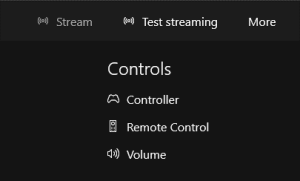 After firing the console up and/or connecting to it, you’ll be able to do a number of things, like use your PC as a media remote or mimic the Xbox controller with your mouse/touch, but given the scenario we’re interested in, let’s try testing the network for size.
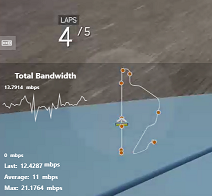
 Once the streaming has started, if you move your mouse or finger to the top of the Xbox app window to display the in-app menu, you can change the quality of the experience, by clicking on the icon on the top right. The multi-line icon to the left of that will show you real-time streaming data in the bottom left of the screen, so you can monitor the performance of the network and make sure you’ve got the right level of quality.
 This weekend sees most of Europe moving from summer time (or
  Outlook – whenever an appointment is created, its date and time are recorded as an offset from
  telling Outlook by clicking the Time Zone icon in the ribbon, and then selecting the appropriate TZ – especially useful if you’re crossing between time zones and don’t want to run the risk of horological befuddlement.
 If you’re booking a load of appointments in another time zone – eg. you’re working in another country for a few days and creating appointments with people in that locale – then it’s even worth switching the TZ of your PC whilst you do the diary-work, to save a lot of clicking around in setting the appropriate time zone specific to each meeting.


 using the built-in OneDrive client in Windows 10 (look for the white cloud in your system tray, if you’ve set up your Microsoft Account within Windows 10).
 You can also see what other people have shared with you by looking
  sends the sharing email, for example), it will take you straight into that list of shared content, and (again, if you have Edit rights), will give you the option of adding that folder to your own OneDrive. As well as appearing in your Shared list, the folder will now show up in the regular list of folders you see when you look in OneDrive, even though it doesn’t belong to you.
 Choose Folders, you’ll see the newly-shared folder appear in the list of folder available to sync, just as if it belongs to your own OneDrive storage. Check the box next to the new content to keep a synchronised copy along with your own OneDrive content. Looking at the shared, synced files in Windows Explorer, you won’t be able to see who originally posted the file into the folder, but if you view it in the browser, then it’s possible to see that info.
  Office 2016 for the PC is nearly here. Many Office users have been already running a preview version,
  One nice end-user additions to most Office apps (sadly, not OneNote) is a new feature called “
 Click on the light-bulb on your menu, (keyboard warriors press ALT+SHIFT+Q, or just ALT then Q), and type what you want the Office app to do… and rather than just showing you help about how to do it yourself, it may jump straight to that command.
 Well, attaching files got a bit different in Outlook 2016, and it’s one of the neatest new features, even if it’s not
 Be careful when sending attachments to external users as it could be quite easy to send them a link to a shared document (which they won’t be able to access) instead of a proper attachment.
 What Sidetone does is to play your own voice back into the audio stream you’re listening to, so if you have a headset that covers your ears entirely and blocks out background noise, you don’t completely isolate yourself and end up shouting to compensate.
  double-click on your headset and look in the Levels tab.
  Advert blocking in Internet Explorer was covered back in

 Some sites will substitute blank space for the missing ads, but for content like the Other Stuff you might want to click on (such as the Taboola-type clickbait guff that’s normally at the bottom of the page), site may just quietly ditch whole sections without you ever knowing.