#785: Enshittification (Part II) – snapping & mapping fails

Around a year ago, old-school Tip of the Week had a “2025 Enshittification: part 1” post which looked at how online services routinely drop features that people like because it suits the provider to not sustain them. It’s high time to revisit the topic, specifically looking at changes being made to online mapping services and one popular document scanning app.

In truth, if you’re going to rely on a free service, be ready to expect the provider to muck it up for you. If you like to look at your old house on Google Street View, best head over there now and screengrab it as some day they may decide to stop storing previous captures or something.

It feels like it’s only a matter of time before Amazon starts making Alexa a paid-for service, or subsidises free use for telling you the weather or play the radio by playing “would you like to buy a new Carlos Fandango umbrella to protect you from tomorrow’s rain?” inline ads.

Microsoft Shutters Lens

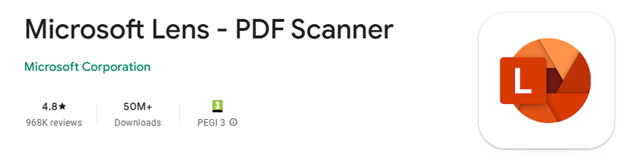
A bit niche, maybe, but Microsoft has been offering a scanning app for smartphones for years. Originally called Office Lens and available for Windows Phone since 2014, later rebranded (of course) Microsoft Lens and even gaining “PDF Scanner” to tell you what it’s primarily for. It was previously discussed in old ToW #682. There used to be a PC app as well as iOS and Android ones, but that has gone already.
Article content

Despite nearly 1M ratings of average 4.8 and over 50M downloads on Android, its days are numbered. Rather than keep Lens alive, Redmond has decided to build some of its functionality into other apps, like OneDrive and/or OneNote. Sadly, neither is as simple, fast or fully-featured as Lens is/was. RIP.

Of course, there are plenty of other alternative scanning apps, including the built-in one for Android users, where you just point the camera at something which looks like a document and it’ll give you a shortcut to Google’s own scanning software which can detect page edges, bundle multiple scans into a PDF and so on. Since the scan feature is part of the Files app, you can go there and start a scan directly too.

Article content

At least Lens had a fulfilling life in the sun, unlike Viva Goals, a product of acquisition which likely cost Microsoft $200M+, and was deep-sixed after only 2 years.


Google “Privacy” copout

How many times have you seen a statement like “for your safety and security”, and realized that its primary goal is actually to make somebody else’s life easier?

Google had a neat feature, if you chose to turn it on, where Maps on your phone would keep a record of where you’ve been and upload to your Google account, so you could view your travels within Google Maps on your computer. Called Timeline, it was briefly covered in previous ToWs including the trend for apps to be replacing websites and not always to the users’ benefit.
Article content

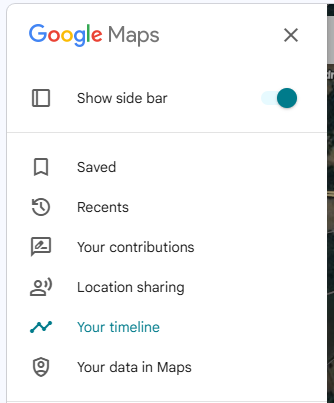
Timeline was discontinued so you could no longer go to Maps and see where you’d been in the past. It’s tantalizingly still there in the menu today, but all it does is tell you to use the mobile app and offer more help on the activity controls.

The reason? For privacy’s sake, Google was no longer going to store all that info on its servers, rather the tracking data would only live exclusively on your primary phone. Sounds fine, unless you lose the phone and don’t have it backed up, or some other calamity occurs and deletes all the data.

Is this to protect the user? Or is it to protect Google from liability in case its service was somehow compromised, and the whereabouts of millions of people over time had been made available?

The DIY Alternative

If you like the ability to track where you’ve been, whether that’s to make your mileage claims easier or just to provide yourself an alibi when accused of being somewhere else, there are alternatives to Google Maps / Timeline though none are quite so easy to use. Self-hosting – as in running a server on your own network rather than relying on a cloud provider who might vanish tomorrow and/or start monetizing your data – is a favoured option for tin-hat wearers and honest folk concerned with privacy and/or who prefer to make their own lives difficult.

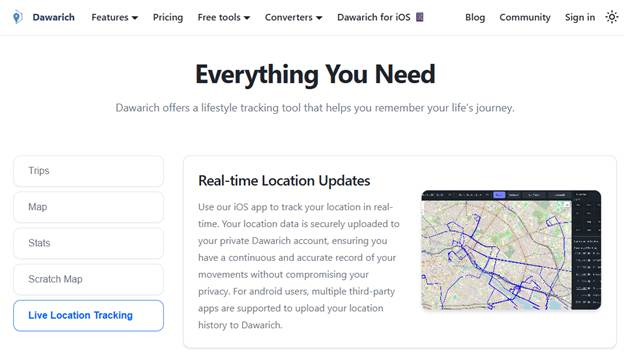
The leading alternative to Timeline is probably an open source project called Dawarich, available either as a subscription cloud service or software you can run on your own. If you have a Synology NAS device with enough oomph to run Docker, there’s an easy to follow* guide, How to Install Dawarich on Your Synology NAS.
Article content
Dawarich.app

*easy to follow may be relative to your exposure to config files, IP address mapping etc

Dawarich lets you import location history from Google Maps or you can have apps on your phone regularly tracking and reporting your location history directly to your Dawarich server.


Is Bing Maps really a Zombie?

Sticking on the theme of making mapping stuff worse, Microsoft has been busy “evolving” Bing Maps.

Launched as “Virtual Earth” over 20 years ago, it morphed into numerously named Windows Live, MSN and eventually Bing Maps for consumers as an alternative to Google Earth and Google Maps, and also aimed at enterprises in the hope that they would build mapping services into other applications and pay for the privilege. There had been a previous set of software and services called MapPoint dating back to the Y2K, now superseded.

There were some cool features that differentiated Bing from Google when it came to maps – things like high-resolution “Birds Eye” images taken from spotter ‘planes…

Article content
Microsoft UK HQ – TVP – in old “Birds Eye” images – note that B5 was still being built, so must be 20 years old?

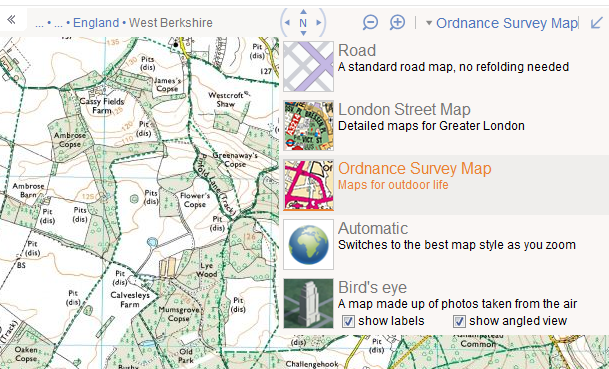
… to free use (for UK users) of the Government’s Ordnance Survey mapping data. At one point, Bing even licensed the old A-Z maps for London, as “London Street Maps”.
Article content
Bing Maps showing Ordnance Survey, with other options including licensed London A-Z Maps

Bing also offered drive-by imagery akin to Google Street View called Streetside. It was never quite as good as Google’s service and it took years to become available internationally, but there were places where it would have more up-to-date pictures compared to Google’s own Street View pictures and data.

Article content
TomTom “surveyed” Thames Valley Park at a time when the park was closed

As you can see from the view above, the images were taken by cars operated by veteran satnav provider, TomTom. Similarly, the Ordnance Survey maps and Birds Eye images were licensed from other 3rd parties.

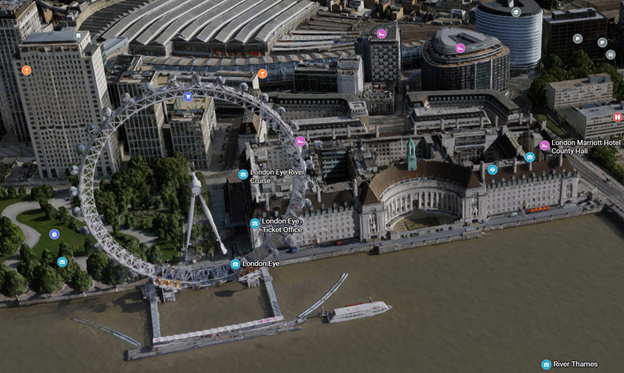
Unfortunately, when a licensing agreement exists then it also means at some point, one or both parties might decide to not continue it. Such has happened with Bing Maps, the consumer offering – it has dropped pretty much everything of interest beyond basic map and satellite views. A 3D option does offer some cartoonish generated models of some areas, though it’s a long way from being universal.
Article content
The London Eye in a mock 3D render. Looks OK from a distance but like a 1990s arcade game up close

Microsoft also had a Maps app for Windows, which was a wrapper for the Bing Maps service but could also deal with offline data. Presumably due to lack of use, the Maps app has now been taken out behind the bike shed and given a good knobbling:

Article content
Nothing to see here, move along, move along

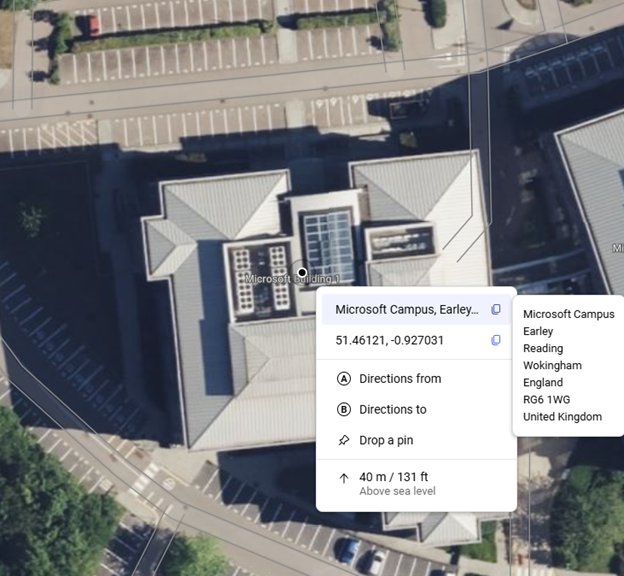
On the plus side, one useful feature which wasn’t present previously, the latest Bing Maps will show the exact address (including Post Code or Zip Code) of any point you right-click on, also displaying the lat/long coordinates and even the height above sea level.
Article content
Bing Maps still shows Microsoft Buildings in TVP. B1 is the last remaining one open.

It was announced that Microsoft is shutting down Bing Maps for Enterprise and migrating everything at the back end to using Azure Maps, which has a different set of functionality primarily aimed at developers looking at embedding maps into other sites and overlaying other data onto a map. It’s easy to wonder at what point Redmond will pull the plug from Bing Maps altogether.

Accessing Missing data from Bing

Sadly, there’s nowhere else providing the TomTom Streetside views, nor the Birds Eye images, other than going to Google Maps and seeing what they have.

If you miss the OS Maps feature from Bing Maps, there are few alternatives – the best is probably OSMaps.com, which still offers (for a subscription) what they call topographical maps (i.e. OS LandRanger or Explorer). It’s a little clunky but has a reasonable mobile app too, so you can plan trips and take them offline with you.

Article content
TVP from the Ordnance Survey site – www.osmaps.com

#784: Automatic for the People

Following on from last month’s missive (#783) on internal competition, we’re going to look at a case where it may have successfully spurred a company, and an example of surprising collaboration between erstwhile competitors.

Also, how is it 33 years since R.E.M. released AFTP?

The world’s first automatic chronograph watch

In the 1950s and 60s, clock and watch making was a hotbed of innovation just like the automobile industry  and the race for space. New designs and technologies were coming thick and fast. Quartz crystals and batteries were still way out on the horizon, so the Swiss-dominated mechanical watch industry took great pride in building very precise instruments.

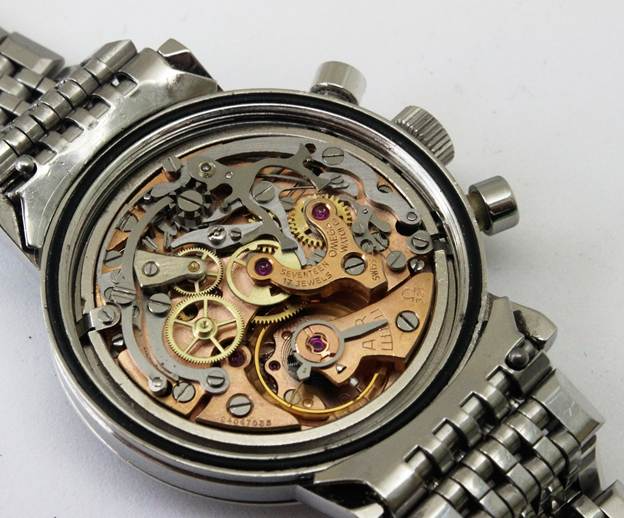
Open the back of a mechanical wristwatch and you’ll see many tiny components meshed together to make a little engine that measures out time and moves the hands on the dial appropriately.

Article content
An Omega 321 movement, as found in the Omega Speedmaster watches which went to the Moon

Everything is generally driven by a coiled spring which is tightened and powers the whole “movement” as it unwinds in a controlled fashion. Manually-wound watches usually need a few turns of the “crown” on the side, perhaps every day or two. Many clocks work the same way, but with a larger spring might only need a few minutes of winding with a key every month or so.

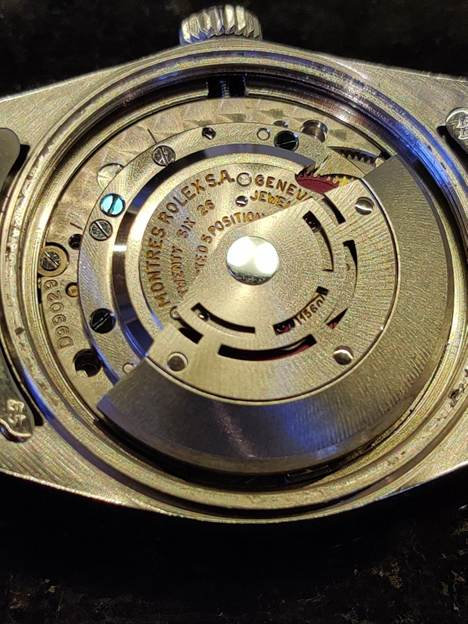
Though pioneered in the late 18th century, automatic watches (which wind the spring through harvesting energy from the movement of the watch on the wrist) really took off in the early part of the 20th century. If you can see the movement of an automatic watch – either through the see-through “exhibition case” sometimes fitted, or by taking the back off it – it will often have a large “rotor” which swings back and forth as you move the watch on your wrist. You might feel or even hear it moving.

An automatic Rolex 1560 movement from the early 1960s

The rotor signifies that the dreadfully tiresome task of winding your watch every day was dispensed with. But some fancier watches with additional “complications” still had to be manually-wound; perhaps most notably chronographs, watches equipped with a stopwatch function.

Early “chronograph” clocks and watches were so called because they recorded the time using ink on the actual dial – making an ink mark or arc to record how long an event (like a horse race) lasted.

Necessity is the mother of invention

Wrist-worn chronographs (which only show the time, not write it) were popular in the 50s and 60s, especially amongst sporting types, perhaps inspired by famous racing drivers like Stirling Moss, Jim Clark or Dan Gurney.

Article content
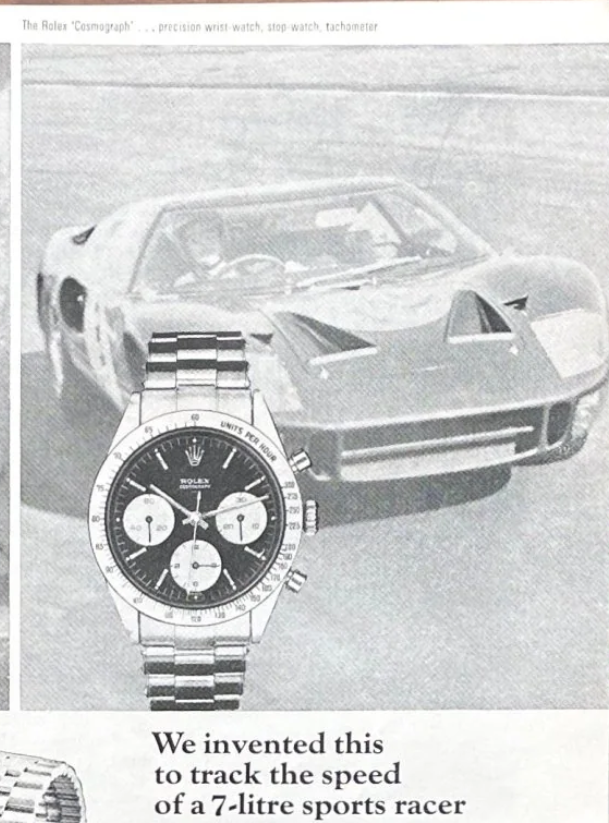
late 60s Rolex “Cosmograph” advert, egging-up the association with fast cars and watches

Go-faster watch companies even named their products like Speedmaster, Daytona (after the Floridian racing circuit) or Carrera (after the Carrera Panamericana race).

But all of these famous chronographs were manually-wound. There was clear demand for the thrusting racy gentleman to have a stopwatch on his wrist that wound itself. Unfortunately, the technical challenge of building such a complicated mechanism that was small and robust enough to wear comfortably was tough.

It was common for watch makers to buy-in the movement they fitted to their watch, just as they’d have the dial made by a specialist, the case fabricated by another and so on. Think of it like a boutique car maker producing a vehicle using an off-the-shelf engine from an external manufacturer. Even major watch producers at the time, bought watch movements from “ébauche manufactures” like Valjoux, Lemania or Venus, none of whom had the resources to dedicate to producing an automatic chronograph. The famous Paul Newman Daytona – auctioned for $15M+ – had a manual-wind Valjoux 72 movement.

So began a famous collaboration between companies that might otherwise be seen as competitors – the watchmakers Breitling, Buren, Hamilton and Heuer got together with  Dépraz, who made components for movements, to form what is now known as the Chronomatic Consortium.

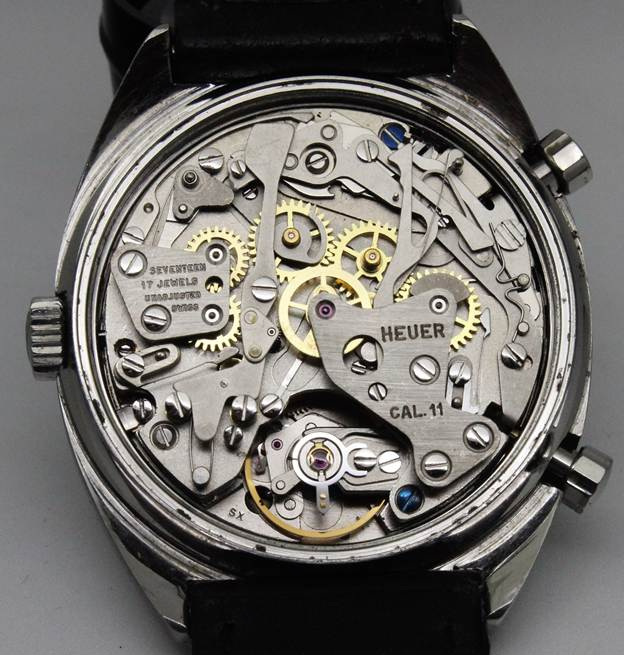
Buren had pioneered their own automatic movements which had a “micro-rotor” rather than a big plate half the diameter of the watch. Dépraz had a chronograph module which they figured could be adapted to essentially bolt on to a variant of Buren’s base movement, thus giving them essentially two mechanisms powered by the same spring. In order for them all to fit together, the crown for setting the time had to be on the opposite side to the pushers that worked the chronograph.

Article content
A Heuer Carrera from 1969, with the Caliber 11 movement. Note the tiny micro-rotor on the upper right of “HEUER”

In 1969, Breitling, Heuer and Hamilton (who absorbed Buren during the years of development in the late 1960s) went on to launch ostensibly similar watches with the same basic “Caliber 11” movement within. Heuer’s are arguably most iconic, with the square-cased Monaco appearing on the wrist of the King of Cool, Steve McQueen, in the 1971 film, Le Mans.

Article content
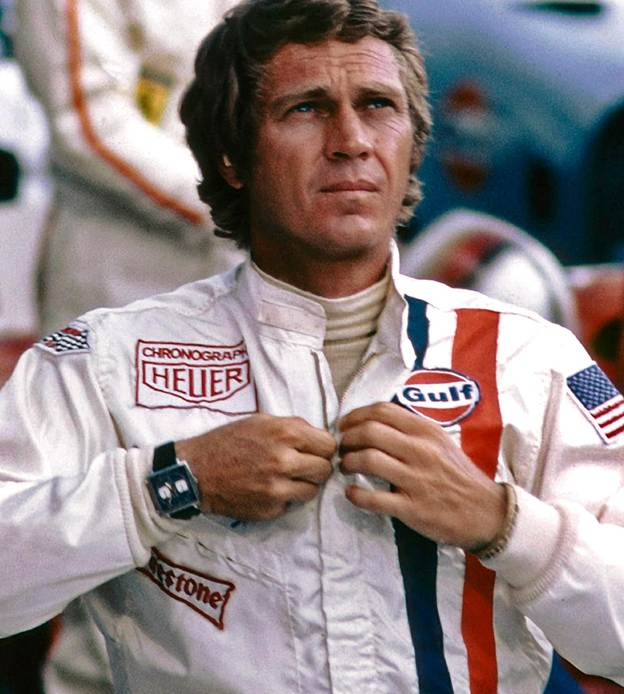
Steve McQueen supposedly chose the square Heuer Monaco to match the patch on his race suit

The story behind McQueen’s watch is quite fortuitous; Heuer had a name for sports timekeeping and sponsored various cars and race teams. When McQueen was preparing for the Le Mans film, he said he wanted to look exactly like pro driver Jo Siffert, so donned the same overalls with the big Heuer logo. They also supplied props for the filming including watches.


Heuer and the rest of the “Project 99” / Chronomatic group touted their watches as the world’s first automatic chronographs, though competitor Zenith had been working on their own in-house movement and were so confident they would be first, they launched it in a watch brazenly called “El Primero”.

Even though they’d been working on it for 8 years, and announced it in January 1969, it took Zenith until September ‘69 to start selling their watch, by which time they were more like “El Tercero”, as the Chronomatics’ Caliber 11 was already being sold under several brands, and unseen but coming up the inside on the rails was a company very far from the Swiss cartels, who had designed and built an automatic chronograph and started manufacturing AND selling it in early 1969: Seiko.

Taking on the Swiss

Founded in late 1800s, “Seiko” was in fact several companies under the family of its founder, K Hattori. As Japan opened up to outside trade and competition, Hattori-san started by importing and selling western clocks, jewellery and watches, before starting to develop its own in-house offerings.

After WWII, Seiko developed a diverse range of horological kit – the official timekeeper of the 1964 Tokyo Olympics, Japan’s first Automatic watch, its first Chronograph, first diving watch, even getting into high-end accuracy in watches such that they took the fight to the Swiss on their own turf. There were watch “trials” in Neuchâtel and Geneva in the early 60s, to showcase how manufacturers could produce watches of incredible accuracy. After a few misses, Seiko showed up and started wiping the floor – to the point where the highest profile trials were cancelled the year after. Maybe the Swiss didn’t like getting beaten so took their ball away and went home.

Seiko’s “warring factories”

Revisiting the theme of internal competition, one unusual aspect of Seiko’s approach was to have two completely separate factories, separate companies even, operating to win the same customer. Daini Seikosha, in Ginza, downtown Tokyo, and rural Suwa Seikosha, near Nagano, shared hardly any technical know-how and yet were seemingly pitching similar watches to the same customers. The short version of history is that they were out and out competitors, but a subtler take is that both Daini and Suwa were children of the parent, and expected to treat each other with familial respect, even splitting some tasks occasionally.

A somewhat unlikely source, tech company Atlassian hosts a great series of podcasts on telling stories of team working, and they had a really good 30 minute one from the depths of COVID time, on Seiko’s “Duelling Factories”.

It’s never really been satisfactorily explained why Seiko had two factories that shared so little. There are some examples where a watch developed in one was manufactured – perhaps only for a short while – in the other as well (maybe a capacity issue?), but allowing two separate R&D outfits to develop products that directly compete for the same customer seems like madness to most of us. Then again, look at vintage catalogs, and there are hundreds of pages of barely distinguishable watches, so maybe they just threw everything they could at the wall to see what stuck.

The race for space

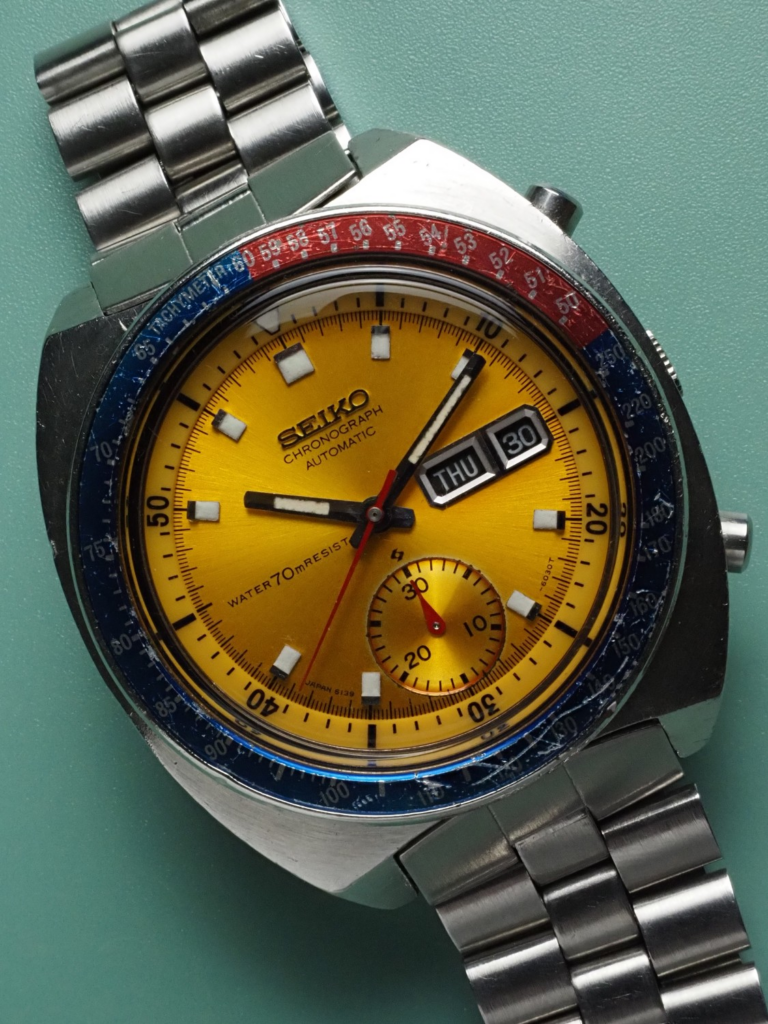
The Suwa factory arguably won the race to make the first automatic chronograph; they had 6139-6010 model watches in production from January 1969. When Jack Heuer, CEO of the eponymous company, was exhibiting their first Caliber 11 watches at the Baselworld show in the spring of 1969, Seiko’s president congratulated him on their achievement, electing not to mention that Seiko had built their own, integrated, in-house automatic chronograph and had been already selling it for months, at a fraction of the price of the Heuers, et al.

The 6139 chronograph went into numerous shaped watches over the decade or so of production, famously adorning the wrists of Bruce Lee, Flash Gordon, even making it as the first automatic chronograph in space via the pocket of Col William Pogue. What later transpired is that Pogue’s mission Commander, Jerry Carr, was sneaking aboard a Movado chronograph too. Movado was a sister brand to Zenith, and its watch ran on Zenith’s 3019 PHC “El Primero” movement. So a dead heat to be the first in zero gravity, then.

In the meantime, the Daini Seikosha factory had been working on its own, thinner and slightly more exotic, automatic chronograph movement – the 7016. Sharing no components whatsoever and being of quite different architecture to the 6139, the 7016 was a few years later to market and arguably missed the buzz of its sibling. As such, 701x watches are a good bit rarer.

Article content
Seiko 6139-6001 from October1970 – note the Suwa logo below the hands just above the subdial
Article content
Seiko 7016-5001 “Monaco” from August 1974 – the Daini logo sits just below AUTOMATIC at 9 o’clock

Both movements were integrated, i.e. designed from the outset as automatic chronographs, rather than bolted together such as the Chronomatic Cal 11. The 6139 was the first chronograph to use a vertical clutch, an advanced coupling mechanism now the norm for high-end watches from Rolex, Patek Phillippe and so on. The 7016 has a sub-dial register which counts both hours and minutes, has a horizontal clutch but features a flyback mechanism and was the thinnest automatic chronograph movement for 15 years. The more popular square-ish case shape also leads to its nickname, “Monaco”, after the Heuer model.

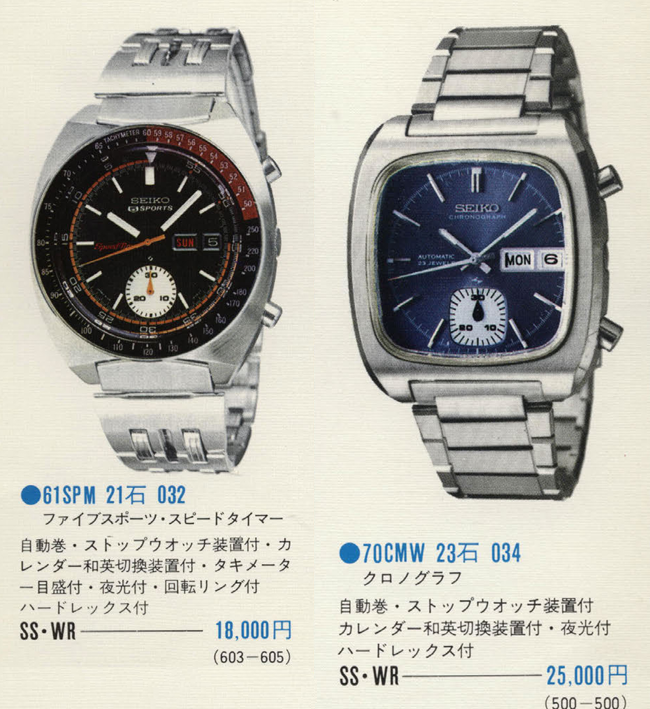
Taken from 1972 JDM Seiko catalogs
Article content

Maybe they were aimed at the same customer, though the 7016 was around 38% more expensive than an equivalent 6139. Presumably available side-by-side from the same retailer. What were they thinking?

#783: Is competition innovative or distracting?

Anyone who has worked in technology has probably dealt with a competitive situation.

Maybe it’s trying to position your solution against all the others companies’ products, perhaps it’s the annual performance review tussle with your so-called “co-workers” or you’re just trying to get funding or investment from the higher-ups to get something done (when they might prefer to spend the money elsewhere). It can be exhilarating and exhausting.

Competing with other external parties to deliver a service or a product probably sharpens the minds of the people developing it, so in theory having strong competitors should make you stronger too (or you don’t survive). But does internal competition improve offerings,  make the organisation more efficient, or is just a giant distraction? If “leaders” spend time fighting with each other instead of focussing on the end goal, maybe they’ll eventually lose out to more agile or innovative competitors [See IBM, HP, Digital, Intel…]

Some companies have consciously fostered internal competition or even conflict to accelerate their own developments. Occasionally, companies will pool resources with erstwhile competitors to help them innovate more quickly or to gang up against even stronger companies.

Microsoft and Apple

Both Microsoft and Apple have evolved through several phases from the mid-1970s until now. For Apple, there was the first era of founding Steves Jobs & Woz, then Jobs booted out and Apple nearly going bust, Jobs coming back and saving the world, before Tim Apple took the company to be the biggest in the world.

Microsoft had a parallel of Bill & Paul founding and expanding in the early days of microcomputing, to Windows dominating the OS landscape, Steve Ballmer taking over and laying some of the groundwork for the transformation to being a cloud company that Satya has driven.

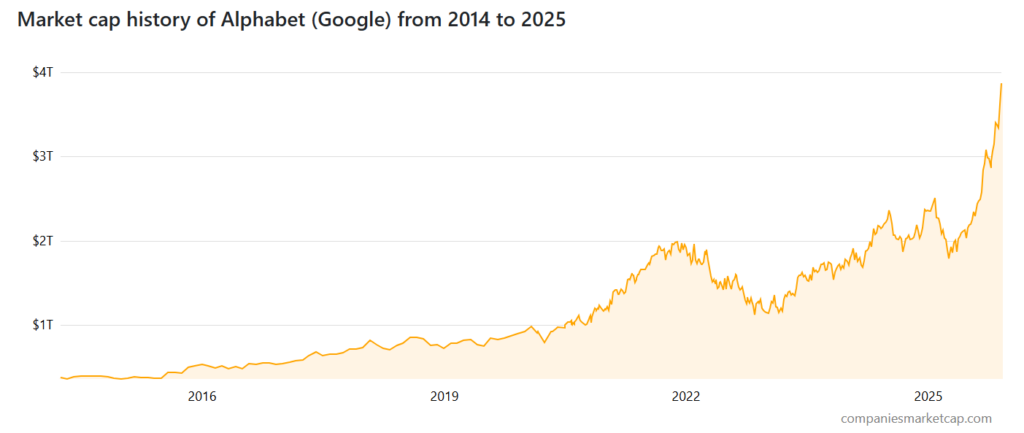
Not many companies get to pivot so many times and still be not just relevant but at the front of their field. They’re still 2 of the most valuable companies ever, by market cap, at time of writing, stocks can fall as well as rise etc etc. Somewhat ironically, since starting to write this piece, Google has overtaken Microsoft for the first time, their value more than doubling in less than 8 months.

Article content

A bubble, you say? Shurely shome mishtake.

Maybe the presence of a talismanic founder or two can help companies in their early stages – in Robert X Cringely’s excellent historical guide to the early days of the microcomputer industry, Accidental Empires (1992), he addresses both Jobs and Gates. Chapter 10, “The Prophet”, starts by calling Steve “The most dangerous man in Silicon Valley”. Bill, in “Chairman Bill Leads the Workers in Song” is characterised as the Henry Ford of the microcomputer industry.

Sometimes, Bill is said to have actively fostered internal competition between different groups rather than imposing a way of doing things – the thinking being that if two or three groups each try to solve a problem then the best solution will win.

Article content

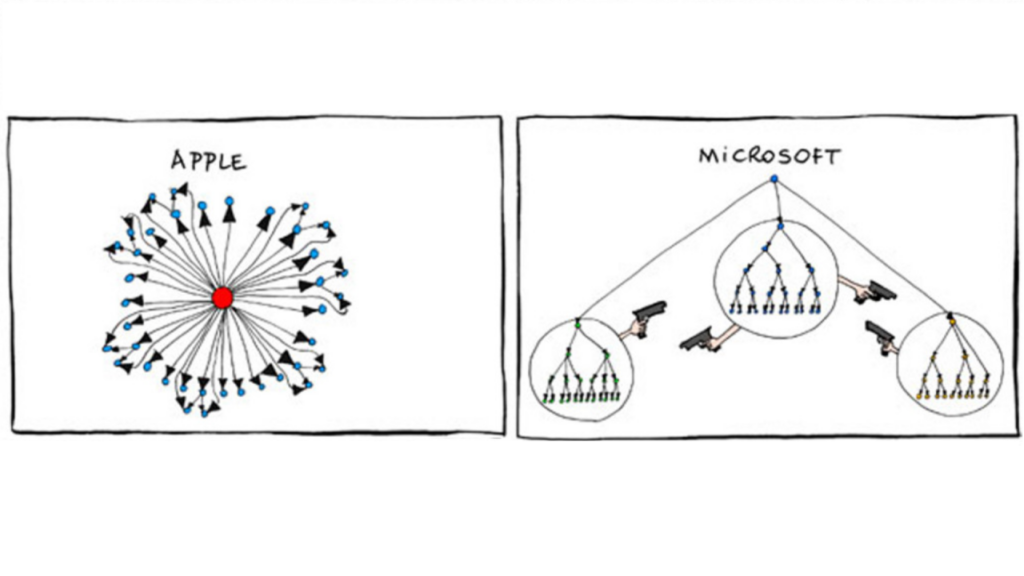
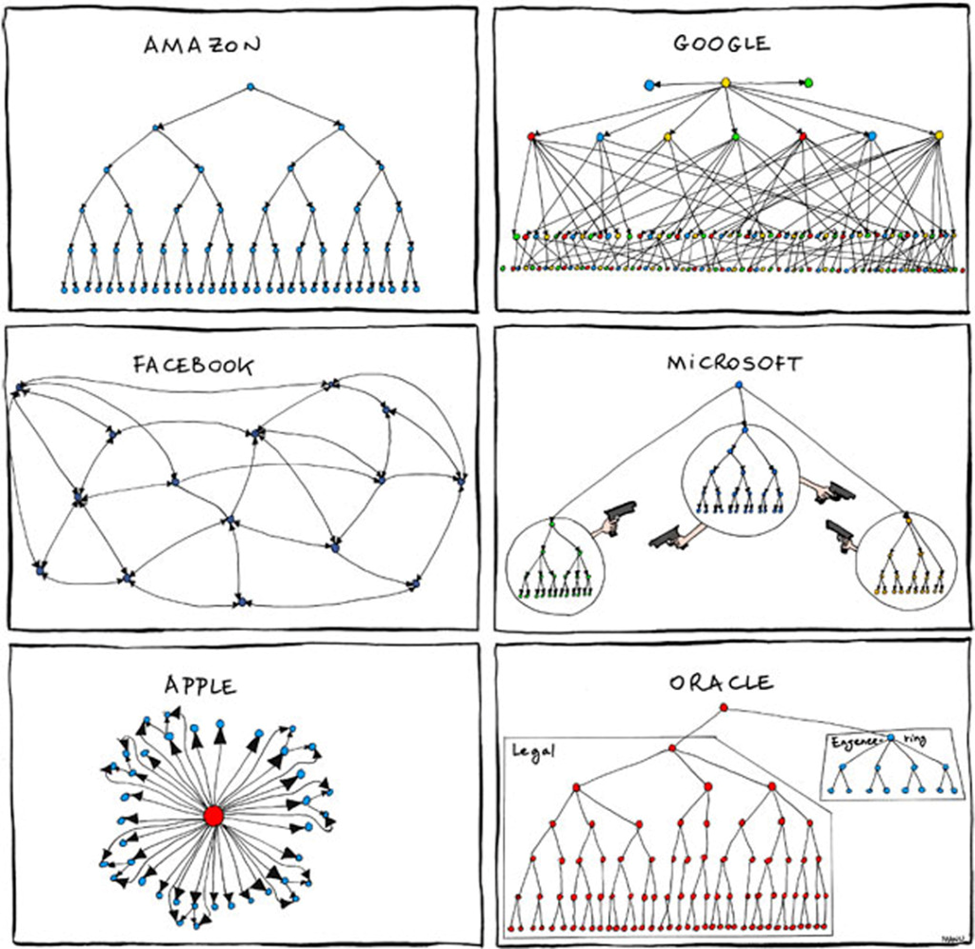
This old joke org chart comparison illustrates a few truisms – at Google, Larry & Sergei might have had the ideas, but Eric Schmidt ran everything. Oracle perhaps spent more on enforcing licensing than on engineering, and at Apple (post 1996), everything revolved around Steve and all decisions went back to him.

But if you were at Microsoft in the early 2000s, you’d smirk with recognition at the warring nature of how their product groups sometimes behaved.


MS: Not just about Windows

For many years, Microsoft had the two cash cows of Windows and Office. The Operating system was licensed to PC manufacturers and sold to enthusiasts and businesses who upgrade every few years. People even queued at midnight on August 24th 1995 to buy a copy of Windows 95; apocryphal stories did the rounds of some shoppers not even owning a computer but they got caught up in the hype for fear of missing something.

Internal influence was rather staked on which part of the division you worked in – Windows, especially under BillG’s tenure when everything else pretty much had to support the Windows business, was the big dog. Office was somewhat secondary but also made Mac versions and was bought by people devolved from whatever cycle they replaced their PC or upgraded its operating system. Server products which ran on Windows NT Server but were tied into usage of Office somewhat straddled the two.

It wasn’t uncommon for Microsoft to have multiple products which overlapped yet were built by different teams – Windows 3.x vs OS/2, Windows 95/98 vs Windows NT, Office vs MS Works, Internet Explorer vs MSN. Even within product groups, there were often numerous bits of technology being developed which had already been built by another team (at one point there were 3 or 4 different and incompatible ways of doing “workflow” processes).

There’s no doubt that there was wasted effort – products would go through long development cycles only to be canned before release (or like KIN, shortly after). In a remarkably honest interview to coincide with Microsoft’s 50 years anniversary, Steve Ballmer admitted there were silos between productivity and systems divisions. A very in-depth interview with Steve on the Acquired Podcast delves deeper into his regrets around the “Longhorn” development that cost the company years.

Show me the money!

Between 1997 and 2000, the company’s revenue grew from $12Bn to $23Bn but net income nearly tripled from $3.5 to $9.5Bn. What was behind the success? Enterprise software sales. The steady growth of Windows NT and the associated client licenses for running back-office servers, along with SQL Server database and Exchange Server for email was really paying off.

By comparison, Microsoft’s FY25 numbers came out at $281.7Bn with a net income of $101.8Bn – even adjusting the FY2000 numbers using the Bank of England Inflation calculator, the latest figures are remarkable. 2025 revenue is 641% of 2000’s and net income is 561%.

Over time, Microsoft shifted away from just being dependent on Windows & Office, by adding numerous other successful businesses, focusing on Enterprise then the cloud and latterly bunging AI into every offering.

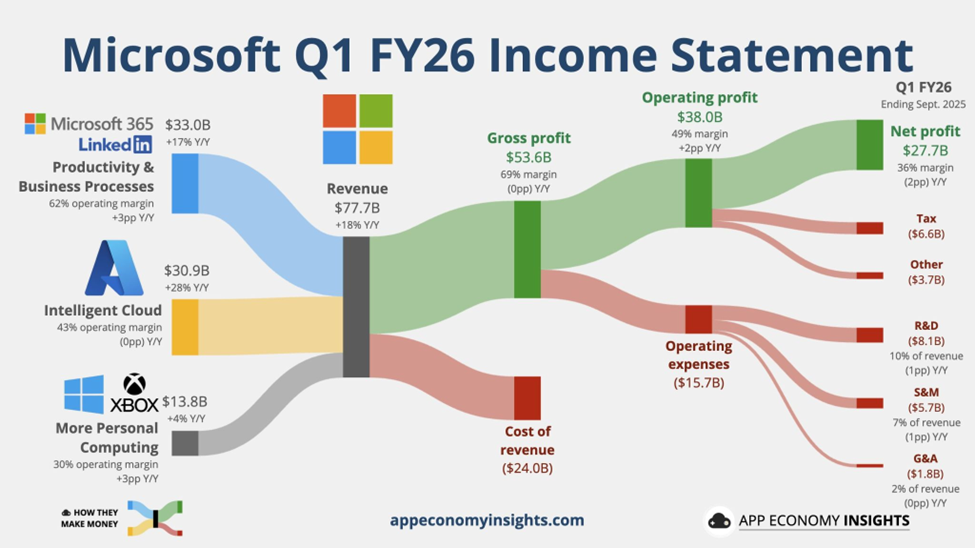
Every quarter when they release fiscal results, Jack Rowbotham posts on LinkedIn summarising where the money flows – and using visuals produced by App Economy Insights it’s quite clear where the power lies now.

Article content

Whatever you think of Microsoft, if you cut the company, they bleed software (and services).

Hardware has always been a means to an end – to sell and use the software. The original Microsoft Mouse was just a way to get people used to the graphical interface that would eventually be the key UX of Windows. Today, Surface devices aim to show how a great PC can be and, for now at least, Xbox continues to be the means to sell more games (and Game Pass subscriptions).


Apple – the Return of the King

Article content

Microsoft and Apple have had a “complicated” relationship since the early days.

Bill and Steve had a degree of respect and even friendship for each other, but as both companies became successful there were clearly times when they were at loggerheads.

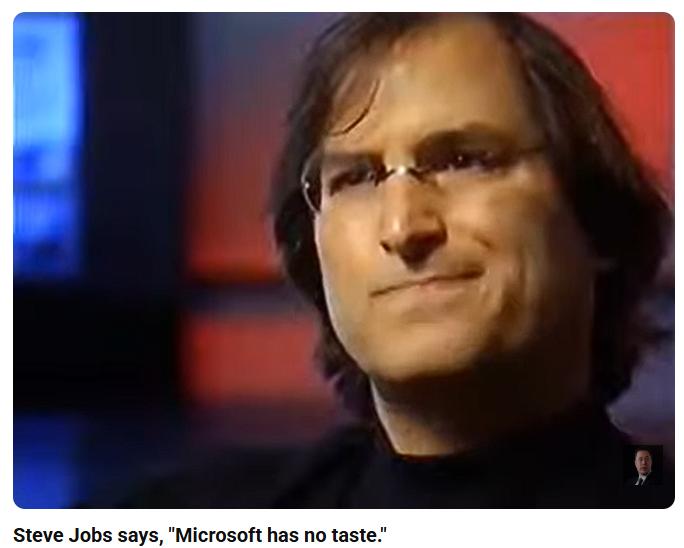
Article content

In that seminal interview, Steve lays out his vision for humanity of taking the very best of things to improve itself, casting Apple as true innovators and Microsoft as pedestrian followers.

Jobs famously went to visit Xerox PARC and took inspiration from what they were doing with graphics, mouse, printers and networking as the genesis of the Apple Lisa and later Macintosh products. The Mac has always been a niche offering – arguably beautiful, proprietary and expensive, it could never really compete for the mainstream in the same way that Mercedes or Jaguar or BMW were always going to be in a different league to Ford and Toyota.

The PC and DOS had become hugely successful and when Microsoft debuted Windows, Apple was clearly not happy. Lower-cost, more diverse PCs with many peripheral and software companies building on top of them competed against the Macs with relatively few software packages being developed. Jobs was fired by Apple in 1985. There were attempts to create other products, like the Newton, but they proved unsuccessful and perhaps a costly distraction.

Apple was circling the drain, and at the time of Jobs’ return in 1997, it was said that Microsoft made more money selling Office to Mac users than Apple did selling Macs to Mac users.

Quoting Bob Cringely again, whose book was published before Steve Jobs came back to save Apple from itself:

Steve Jobs holds an idea that keeps some grown men and women of the Valley awake at night. Unlike these insomniacs, Jobs isn’t in this business for the money, and that’s what makes him dangerous.

Jobs came back and brought in some help from outside – including Larry Ellison from Oracle, despite the boos from the faithful. Steve began admitting that Apple would like to do some software and having software industry expertise on the board might be a good idea.

He also suggested that Apple and Microsoft were going to partner more closely – as a way of resolving some long-time disputes relating to look and feel of Windows and Mac, and Microsoft agreeing to keep supporting the Mac platform with releases of Office at the same cadence of the ones for Windows.

Microsoft was also going to pump some cash in to make sure Apple was kept alive (a useful bet against the Department of Justice, who were breathing down Redmond’s neck at the time). The $150M of non-voting stock that Microsoft bought was sold 6 years later for $550M, so that worked out well.

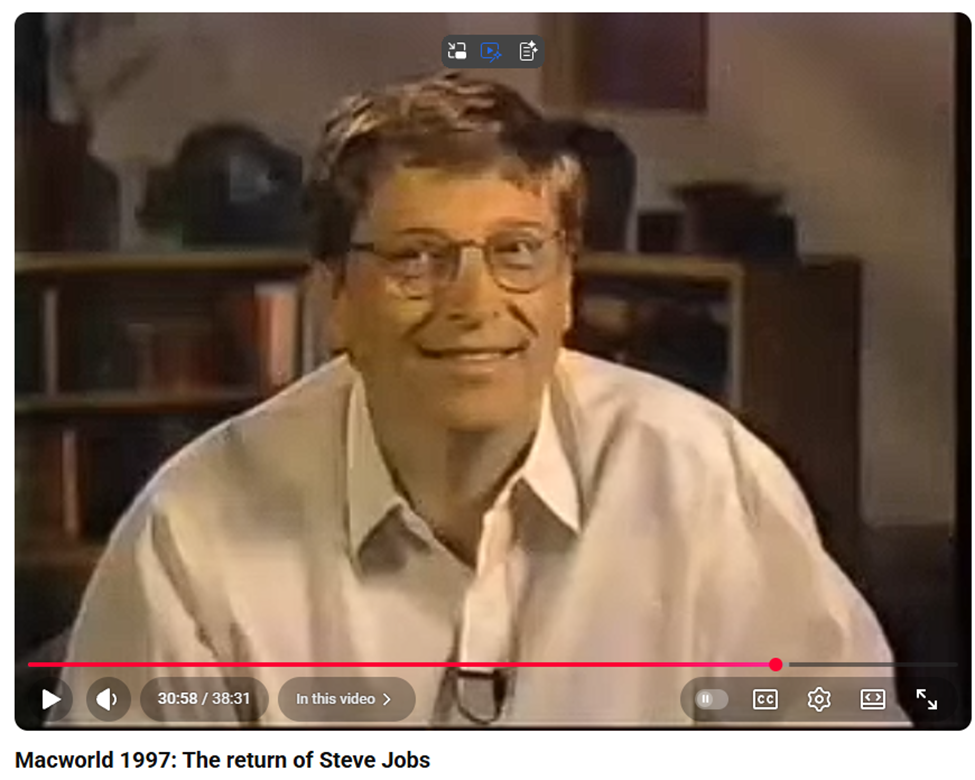
The jeers from the Apple fans at Macworld 97 were not just reserved for Larry from Redwood: Bill from Redmond got even more.

Article content

Jobs made a hugely important point to the Macworld congregation at the time: they need to let go of the idea that for Apple to win, Microsoft has to lose. This idea that competitors can sometimes work together for mutual benefit or even survival is clearly valid.

Apple makes Things

Meanwhile, Apple has gone from near death to world dominance. Jobs led an obsessive focus on customer experience, which made sure they built products that people loved. The iMac injected some pizazz into the ageing Mac product lineup, launched a hugely successful laptop line in PowerBook and MacBook, and came up with a variety of ancillary products like the iPod, iPhone, iPad and Apple Watch. By Q1 2007, the iPod on its own was responsible for almost half of Apple’s revenue.

The iPhone was the true saviour of Apple. For the first time, it attracted new customers to the brand, and they’d go on to buy Macs because they liked the experience (and the integration was well thought out). But it had a difficult gestation: Jobs deliberately kept the development of iPhone separate from the Mac, with direct oversight and freedom for that design team. He fostered direct – sometimes hostile – competition for the software platform to be used in the phone. Either the iPod would grow to become a phone, or the Mac OS X would be shrunk to form a new OS. The latter prevailed.

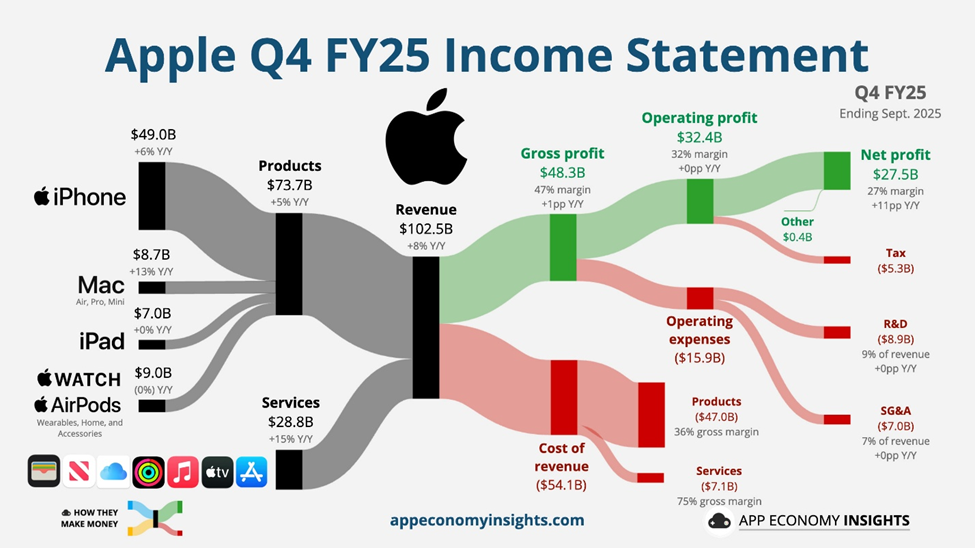
Looking at Apple’s fiscal makeup today, you can see that the majority of its revenue comes from products like iPhone, but services like iCloud, Apple TV, iTunes etc make up 28% of its revenue but 45% of its gross profit.

Article content

If you cut Apple, it bleeds devices and the related experience. They make great hardware which people love because the design and the software that drives it is well thought out. But the profitability growth is really behind the subscription services that provide that experience: nearly 45% of Apple’s gross profit comes from that services line, even though it accounts for only around one quarter of its revenue.


Are they still competitors?

Having been frenemies for some time and outright competitors for years (remember the I’m a Mac adverts? … not sure some of them would make the cut these days), do Apple and Microsoft still see each other as even relevant let alone a threat or opportunity?

Article content

Well, Windows still has the lion’s share of the desktop OS, though it’s fallen from around 85% to 65% over the last decade. The key thing is, the desktop has lost its dominance with more people using phones and tablets, and since Microsoft failed to compete in the phone OS and never really built a compelling tablet, it’s even stevens.

In its early days, Apple’s iCloud storage was partly on Amazon’s AWS and partly on Microsoft’s Azure cloud service – in fact, Apple was among the largest 3rd party users of Azure at the time. Reportedly, iCloud moved to Google Cloud and kept on using AWS for some too, alongside massive investments in their own datacenters.

Nowadays, Microsoft pretty much bundles Office in with a subscription so Mac users might not be counted a significant revenue stream on their own. M365 doesn’t care what device you’re using to access its services, as long as you are.

Very significantly, when Satya Nadella took over as Microsoft CEO, Office for iPad and iPhone were quickly released. Some commentators incorrectly attributed Satya’s new openness (Linux on Azure and all that) to account for the release of Office for iDevices, but the development had been underway for years. Steve Ballmer – who famously faux-smashed an employee’s iPhone – had given it the green light.

So, is internal competition really a good thing?

We can never really be sure.

Having several groups pursuing the same goal is inevitably “wasting” resource, but it may be that without that competitive tension they’d miss key breakthroughs, or fail to challenge long-held assumptions. Recognising and capitalising on opportunity, regardless of how difficult its gestation, that’s what marks out success in the long run.

What Apple and Microsoft have both done is to evolve their missions over time; freed the dependence on one cash cow in order to cultivate others. Just as old dogs lose out to young pups and newly-dominant lions kill the cubs of their predecessors for the survival of their pride, maybe the only way for some companies to survive is to encourage and embrace the “overhead” of internal competition in order to find new business.